Best Caption Apps for TikTok — Honest Picks for Every Creator Type
Captioning one TikTok video manually takes 5 to 10 minutes. If you post daily, that is nearly an hour a week spent on one repetitive task before you have even looked at your analytics. This article is a direct answer to the question creators actually ask: which caption app is worth downloading, and what is the catch?
Two questions drive everything here: Is TikTok's built-in caption feature good enough? And if not, which third-party app actually fits your situation? The answers depend on how often you post, how much accuracy matters, and whether caption aesthetics are part of your brand. All of that is covered below, with free tier limits and pricing disclosed upfront.
Key Takeaways
- TikTok's native auto captions are fine for casual posting but fall short on accuracy, styling, and language support for creators who take growth seriously.
- Most third-party caption apps have a real free tier ceiling: watermarks, export limits, or processing caps kick in after a small number of videos — the app store listings rarely say so.
- Transcription accuracy varies significantly across tools, especially for fast speech, TikTok slang, and non-native accents — no app is set-it-and-forget-it.
- CapCut is a capable tool, but its ByteDance ownership is a real decision factor that creators deserve to weigh before connecting their account.
- For creators captioning dozens of videos per week, every caption app on this list is already a bottleneck. GotReach produces up to 300 videos in about 30 minutes from a single idea — a different category of tool entirely.
Why TikTok Creators Actually Need Caption Apps
A large share of TikTok video is watched without sound. Think about scrolling in a waiting room, on public transit, or anywhere it would be rude to play audio. In those moments, the decision to keep watching or swipe away is made entirely by what appears on screen. Captions are the thing that keeps the viewer.
Beyond the silent-viewing reality, research consistently shows that captions improve video engagement, watch time, and completion rates on short-form video platforms. For TikTok specifically, higher completion rates are a direct input to how widely the algorithm distributes your content. Captions are not an accessibility add-on — they are a performance lever.
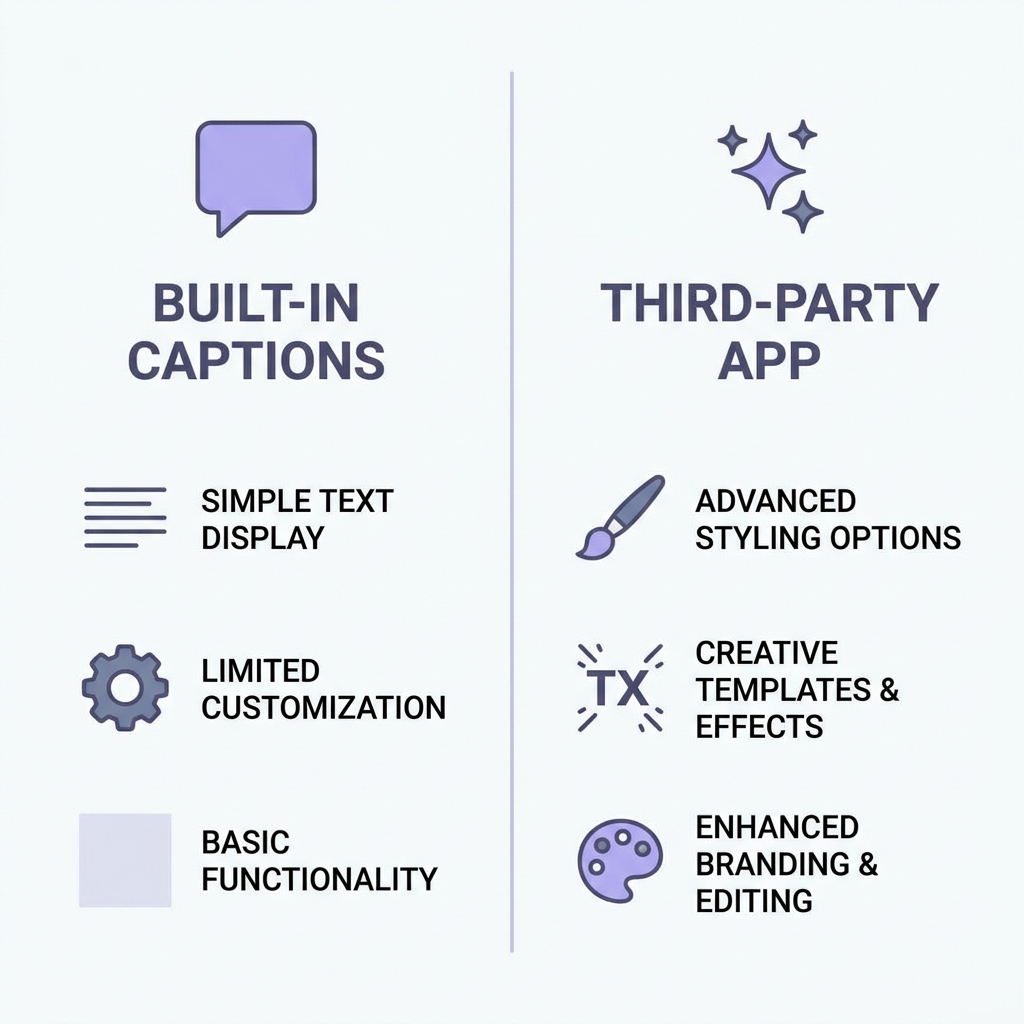
TikTok does have a native auto-caption feature, and it is worth knowing about before spending money on a third-party app. But native captions have real limits: accuracy drops on fast speech and slang, visual customization is minimal, and language support is restricted. Third-party apps exist specifically to solve those gaps — with better transcription, animated styling options, and broader language coverage.
The question is which app solves your specific gap without creating new problems.
TikTok Native Auto Captions vs. Third-Party Apps
TikTok's built-in auto-captions feature is enabled during the upload process. After recording or uploading your video, tap Captions in the editing toolbar and TikTok generates subtitles automatically. No extra app, no export, no re-upload.
What native captions do well: zero added friction, instant generation, completely free, and the captions live natively inside the TikTok editing environment. For a creator posting occasionally who is not concerned about caption aesthetics, this is genuinely sufficient.
Where native captions fall short: accuracy degrades noticeably on fast speech, regional accents, and trending slang. Visual customization is limited to basic positioning and size. Language support covers a smaller set of languages than dedicated apps. And there is no way to apply branded fonts, animated pop effects, or color-highlight styles.
The threshold is straightforward: post casually and do not care about how captions look? Native is enough. Post regularly, care about accuracy, or want captions that match your visual brand? You need a third-party app.
| Feature | TikTok Native Captions | Third-Party Caption Apps |
|---|---|---|
| Cost | Free | Free tier with limits; paid plans from ~$9/mo |
| Accuracy (fast speech / slang) | Fair | Good to Very Good (varies by app) |
| Visual customization | Minimal | Fonts, animation, color highlight, kinetic text |
| TikTok workflow | Fully native, no re-upload | Most require export and re-upload |
| Language support | Limited | Broader (varies by app) |
| Free tier watermark | No | Yes, on most apps after a threshold |
For a deeper look at adding captions across platforms and formats, the GotReach guide on video captioning methods covers the broader picture without repeating what this article addresses.
Top Caption Apps for TikTok — Reviewed and Ranked
Here is the full comparison across the criteria that matter for a TikTok creator making a download decision.
| App | Best For | Free Tier | Accuracy Notes | TikTok Workflow | Starting Price |
|---|---|---|---|---|---|
| Submagic | Growing creators wanting fast, stylish captions | 3 exports before watermark appears | Strong for clear speech; struggles with heavy slang | Export and re-upload | ~$19/mo |
| Captions App | Mobile-first creators who want an all-in-one editor | Limited to a set number of videos/month; processing throttles on free plan | Very good for standard English delivery | Export and re-upload | ~$9/mo |
| CapCut | Creators comfortable with ByteDance data practices | Generous free tier; no watermark on standard exports | Good overall; strong for popular TikTok audio styles | Native TikTok integration available | Free; paid plan ~$10/mo |
| Kapwing | Browser-based creators and teams | 4-minute video limit and watermark on free plan | Solid for standard speech; less optimized for fast TikTok pacing | Browser-based export and re-upload | ~$16/mo |
Submagic
Submagic generates captions quickly and handles TikTok-style animated pop text well. The styled output looks polished without extra editing steps, which is why it has a real following among daily creators. The limitation: the free plan allows only three watermark-free exports before the watermark kicks in. After that, you are paying or re-exporting with a logo on your video. For creators evaluating whether to commit, three videos is not much of a test.
Best for: Growing creators who want stylish, on-trend captions and post frequently enough to justify the subscription.
Captions App
The Captions app offers a strong mobile editing experience and handles transcription well for standard English delivery. The free tier includes a limited number of videos per month and processing can be throttled once you hit the cap — a constraint that user reviews surface repeatedly but the app store listing does not mention. If you are evaluating it as a free tool, expect to hit the ceiling faster than you expect.
Best for: Mobile-first creators who want an integrated editing and captioning environment and are willing to pay for a clean experience.
CapCut
CapCut is genuinely capable: accurate transcription, strong TikTok styling support, a generous free tier, and an optional TikTok-native workflow that reduces the export-and-re-upload friction other apps require. The honest caveat: CapCut is owned by ByteDance, the same parent company as TikTok. A 2023 Illinois lawsuit cited CapCut and ByteDance in a biometric data privacy complaint. That does not automatically make it the wrong choice, but creators who are cautious about data practices connected to Chinese-owned platforms should weigh it. Creators who are not concerned about that have access to a solid, largely free tool.
Best for: Creators who are not concerned about ByteDance data practices and want strong TikTok integration at low or no cost.
Kapwing
Kapwing is browser-based, which makes it more accessible on desktop but adds friction for mobile-first TikTok creators. The free plan caps video length at four minutes and watermarks the output, which eliminates it as a viable free option for most TikTok content. The paid plan is reasonable, and the transcription quality is solid for standard speech, though it is less tuned for the fast pacing and slang-heavy delivery common on TikTok.
Best for: Creators or small teams who prefer a browser-based environment and are comfortable paying for a clean, versatile tool.
For a deeper comparison of how AI transcription quality varies across tools and what drives accuracy differences, the GotReach AI captions accuracy breakdown covers the methodology behind these distinctions.
TikTok Caption Styles — What Is Trending and Which Apps Support It
Caption style on TikTok is a brand decision, not a formatting preference. The look of your captions signals whether your content is polished, casual, educational, or high-energy — and viewers register that signal before they process the words.
Three styles dominate TikTok right now:
Word-by-word animated pop captions: Each word appears on screen as it is spoken, often with a bold bounce or scale animation. This is the style used in high-retention educational and commentary content, where each word appears on beat to maintain pace and viewer attention. It works because it forces the eye to follow along rather than skim.
Color highlight and bold emphasis captions: Key words are highlighted in a contrasting color or rendered in bold while surrounding text stays neutral. This style communicates editorial priority without relying on pacing or sound, making it effective for muted viewers.
Kinetic or motion text captions: Full phrases move, slide, or scale in sync with the audio. It is a higher-production look, more common in entertainment and lifestyle content, and requires more setup in most tools.
Here is which apps support each style natively versus requiring workarounds:
| Caption Style | Submagic | Captions App | CapCut | Kapwing |
|---|---|---|---|---|
| Word-by-word animated pop | Native support | Native support | Native support | Manual workaround |
| Color highlight / bold emphasis | Native support | Native support | Native support | Limited native; mostly manual |
| Kinetic / motion text | Limited native | Limited native | Native support | Not available natively |
If kinetic text is core to your visual brand, CapCut is the strongest native option. If word-by-word pop captions are your priority, Submagic and the Captions app both execute it cleanly without extra editing steps.
How to Choose the Right Caption App for Your Creator Type
Not every creator has the same problem to solve. The right pick depends on your posting frequency, your audience, and how much friction you are willing to accept in the captioning step.
| Creator Type | Top Priority | Best Pick | Why |
|---|---|---|---|
| Beginner (posting 1-2x per week) | Free tier generosity, zero learning curve | TikTok native or CapCut (free tier) | Native captions require no new app; CapCut adds styling with minimal setup and a generous free tier |
| Growing creator (posting daily) | Accuracy, aesthetic control, TikTok workflow | Submagic or Captions App | Both deliver polished animated captions; Submagic edges ahead on styling, Captions App on editing environment |
| Multilingual or global creator | Language support breadth | Captions App or Kapwing | Both support a broader set of languages than native TikTok; verify your specific language before committing |
| Agency or high-volume creator (50+ videos/week) | Volume and speed at scale | GotReach | Caption apps process one video at a time; GotReach produces up to 300 videos in about 30 minutes from one idea |
For most creators, one of the four reviewed apps is the right answer right now. But the agency row deserves a real look. Managing five client accounts, each posting daily, means captioning roughly 150 videos a week individually. At 5 to 10 minutes per video, that is 12 to 25 hours a week on captioning alone. That is not a workflow problem a better caption app solves — it is a category mismatch.
GotReach is built for that situation. It is not a caption app and should not be compared to one: it is a bulk video creation and distribution platform that produces up to 300 videos in approximately 30 minutes from a single idea and distributes across seven platforms in one workflow. The creator's voice stays at the center; the automation handles the volume that caption tools cannot.
If you are at that stage, review GotReach's plan options before spending more time on per-video caption tools. Or start a 30-day free trial and see what 300 videos in 30 minutes actually looks like for your content.
Accuracy, Accents, and Fast Speech — What Caption Apps Handle Well
No caption app is set-it-and-forget-it. Every AI transcription tool makes mistakes on real TikTok content — the question is how many mistakes and how fast you can fix them.
AI transcription struggles most with: rapid-fire commentary delivery where words blur together, regional and non-native accents the model was not heavily trained on, trending slang and platform-specific language that changes faster than training data updates, and background audio or music commonly layered into TikTok videos. A creator doing a rapid commentary at full speed with slang throughout is going to get more errors than someone speaking clearly in a quiet room.
Among the reviewed apps, Submagic and the Captions app generally perform better on standard English TikTok delivery based on user evidence. CapCut performs well on popular TikTok audio formats. Kapwing is reliable for clear speech but less optimized for short-form pacing. None of them eliminates the need for a review pass before posting.
Before you post, run through this:
- Play back the video with captions visible before exporting
- Check proper nouns, TikTok slang, and brand names manually
- Confirm timing sync on fast-speech sections
- Remove or correct filler words the AI kept
- Spot-check the first and last five seconds, where errors cluster most
- Use the app's built-in caption editor to make corrections before downloading
For a more detailed walkthrough of how to review and correct AI-generated captions efficiently, the GotReach caption editing and quality guide covers the correction process without needing to redo it here.
The Bottom Line
TikTok's native captions are a starting point, not a strategy. If you post occasionally and caption aesthetics are not part of your brand, enable the built-in feature and move on. If you post with any regularity and care about accuracy or visual style, a third-party app is worth the effort.
Submagic earns the recommendation for growing creators who want polished, on-trend animated captions. The Captions app is the pick for creators who want a mobile-first editing environment. CapCut is the strongest free option if ByteDance data considerations are not a concern for you. Kapwing fits teams working in a browser environment who are comfortable paying for versatility.
For creators who have hit the ceiling of what any caption app can do at volume, GotReach is not the next caption app to try. It is the step beyond caption apps entirely. Up to 300 videos from one idea in about 30 minutes, distributed across seven platforms, with no per-video time tax.
Start your 30-day free trial of GotReach and see what your content output looks like when captioning is no longer the bottleneck.
Frequently Asked Questions
Does TikTok have auto captions built in and are they good enough?
Yes. TikTok's native auto-captions feature is available in the app's editing toolbar during upload. It generates captions automatically, costs nothing, and requires no extra steps. For casual creators who post occasionally and do not prioritize caption accuracy or aesthetics, it is sufficient. For creators who speak fast, use slang, post daily, or care about how their captions look, the native feature's accuracy and styling limits become a real constraint quickly.
What is the best free caption app for TikTok?
CapCut offers the most generous free tier among the reviewed apps: no watermark on standard exports and solid TikTok styling support. The honest caveat is its ByteDance ownership. If that is a concern, Submagic and the Captions app both offer free tiers, but they are more restricted: Submagic watermarks after three exports, and the Captions app throttles processing after a monthly cap.
Is CapCut safe to use given its connection to ByteDance?
CapCut is owned by ByteDance, TikTok's parent company. A 2023 lawsuit in Illinois cited CapCut and ByteDance in a biometric data privacy complaint. That does not make CapCut off-limits, but creators who are cautious about data practices connected to Chinese-owned platforms should be aware of it before connecting their account. Creators who are not concerned about that have access to a genuinely capable, largely free tool.
Which caption app is most accurate for accents, slang, and fast speech?
Submagic and the Captions app have stronger user evidence for accuracy on standard English TikTok delivery. No app handles all accents, all slang, or all fast-speech scenarios reliably. Every app requires a correction pass before posting, particularly for rapid delivery, trending language, and background audio. Plan the review step into your workflow rather than expecting any tool to eliminate it.
Can I add captions to TikTok without re-uploading after editing?
CapCut offers a TikTok-native workflow that can reduce or eliminate the export-and-re-upload step. TikTok's own native captions feature works entirely inside the app with no re-upload required. Most other reviewed apps, including Submagic, Captions app, and Kapwing, require you to export the captioned video and re-upload it to TikTok.
Which caption apps support multiple languages for TikTok creators?
The Captions app and Kapwing support a broader range of languages than TikTok's native feature. Before committing to either for a specific non-English language, verify that your target language is actively supported in the current version of the app, as support breadth varies and changes with updates.
What are the real free tier limits before watermarks or throttling appear?
Submagic: watermark appears after three exports on the free plan. Captions app: monthly video cap with processing throttles once the limit is hit. CapCut: generous free tier with no watermark on standard exports. Kapwing: free plan caps video length at four minutes and watermarks the output. TikTok native captions: free with no watermark, no cap.