GotReach does not currently clip long-form videos. This article discusses the broader clipping category. For GotReach, use the planned short-form recording workflow, then add captions and schedule the finished videos.
How to Clip Short Videos from Long Content (And Make Them Worth Watching)
If you are producing long-form video, clipping short segments from it should be straightforward. In practice, it is a production bottleneck. Trimming, reframing, and captioning one clip manually takes 5 to 10 minutes. Multiply that by a daily posting cadence across three platforms and the math breaks down fast for a single creator or small team.
This guide covers what makes a moment worth clipping, how the full workflow runs from upload to published clip, and how to choose a tool approach that fits your volume and content type.
Key Takeaways
- A raw trim is not a finished clip. Platform-ready output requires aspect ratio reframing, captions, and a hook at the opening frame.
- Use five specific criteria to decide whether a moment is worth clipping before you start the workflow.
- The six-step workflow from upload to publish is the same regardless of tool. The question is how many steps you automate.
- AI-automated tools are fastest for talking-head content at high volume. Manual tools give more control for niche or narrative-driven genres.
- Free tiers are realistic for testing. Once output exceeds 30 clips per month, a paid plan is the volume decision, not a quality upgrade.
What "Clipping a Short Video" Actually Means (And What It Requires)
Clipping a short video means extracting a high-value moment from a longer source, such as a podcast, webinar, interview, or event recording, and turning it into a standalone piece of short-form content for TikTok, Instagram Reels, or YouTube Shorts.
The raw cut is just the beginning. A 45-minute podcast episode might contain a genuinely compelling 60-second moment, but publishing that raw clip will underperform. Before it is platform-ready, you need to adjust the aspect ratio so vertical platforms display it correctly, add captions because most short-form video is watched without audio, and confirm the clip opens on the hook rather than the host's 20-second introduction of the guest.
Skipping any of those steps does not save time. It produces clips that look unfinished and lose viewers in the first two seconds.
Here is what platform-ready means across the three major short-form platforms, based on current format specifications for short-form video:
| Platform | Max Clip Length | Aspect Ratio | Caption Expectation |
|---|---|---|---|
| TikTok | 10 minutes (60 sec performs best) | 9:16 vertical | Expected. Burned-in or native. |
| Instagram Reels | 90 seconds | 9:16 vertical | Expected. Burned-in or overlay. |
| YouTube Shorts | 60 seconds | 9:16 vertical | Recommended. Auto or burned-in. |
How to Know Which Moments Are Worth Clipping
Tool selection comes after this decision. If you do not know what you are looking for, no amount of automation fixes it.
A clip-worthy moment has four observable qualities. First, it opens on a hook: a surprising statement, a direct question, an emotional peak, or a counterintuitive claim. Not an introduction, not a transition, not a filler phrase like "that's a great point."
Second, it stands on its own. A viewer who has never seen your channel should understand and find value in the clip without needing the full episode for context. If the clip only makes sense after watching 18 minutes of setup, it is not a clip. It is a trailer.
Third, the pacing fits the platform. A well-chosen 3-minute moment will not perform on a platform that rewards 30 to 60 seconds. Length is part of editorial judgment, not just technical formatting.
Fourth, AI moment-selection tools can flag high-energy or high-engagement segments based on speech patterns and vocal intensity. They cannot evaluate whether the moment fits your audience, your brand tone, or the narrative arc of the episode. A guest dropping a surprising line at the 18-minute mark of a podcast is clip-worthy. The host's 90-second guest introduction at the top is not, even if the audio is clean and the energy is high.
The creator who applies these criteria before opening any tool will consistently outperform the creator who accepts every AI suggestion without review.
Clip-Worthiness Checklist
Apply this before committing to the workflow on any segment:
- Does the moment open with a strong hook: a surprising statement, a clear question, or an emotional peak?
- Can the clip be understood by a viewer who has never seen the full video?
- Is the pacing tight enough for the target platform's optimal length?
- Does the clip fit within the platform's maximum length requirement?
- Would a cold audience with no prior context still find genuine value in this clip?
The Full Workflow: From Raw Video to Published Clip
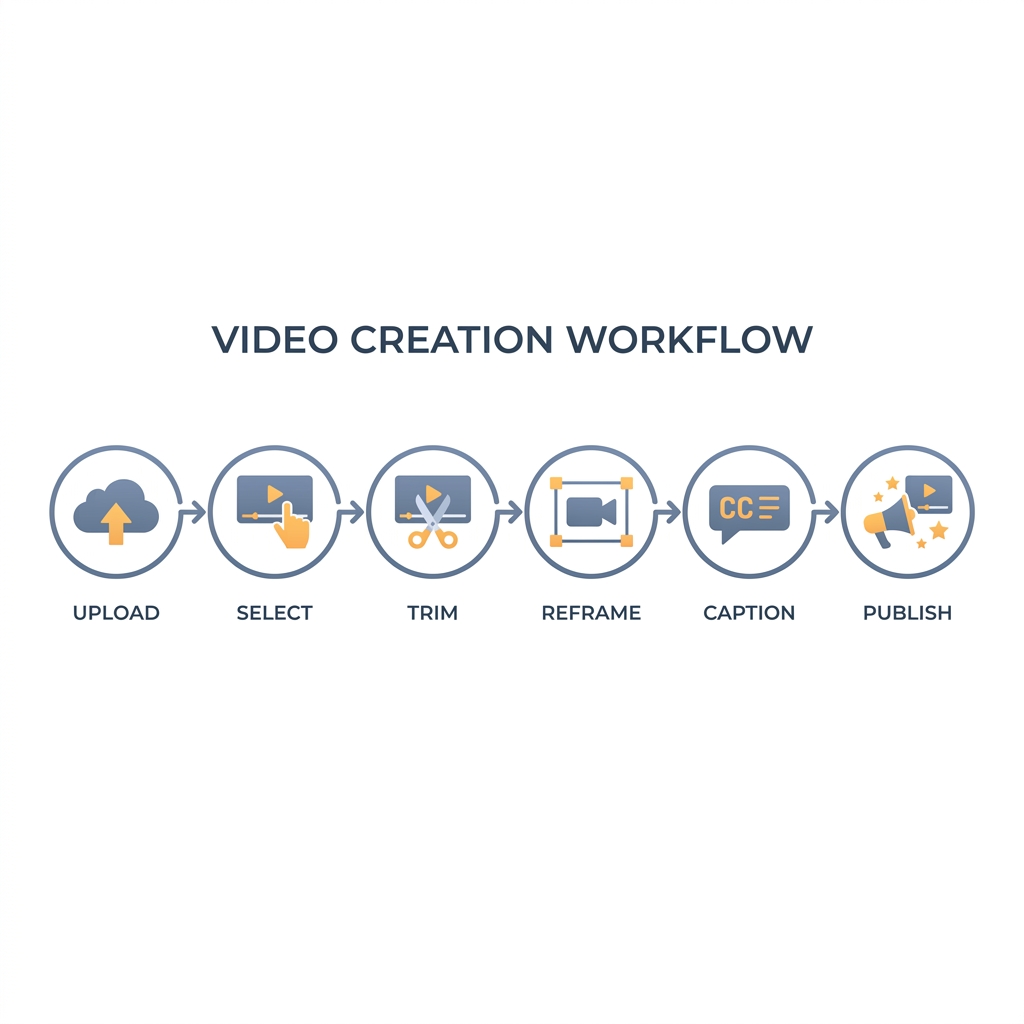
The six steps below apply whether you are using a fully automated tool or editing manually. What changes between approaches is how many of these steps require your attention.
- Upload or import the source video. Add your long-form file to the clipping tool or editing environment. (Automated)
- Select clip candidates. Either let AI flag high-engagement segments based on energy and speech patterns, or scrub manually through the timeline to identify target moments. (AI-assisted or human)
- Trim clip boundaries and confirm the hook. Adjust the in and out points so the clip opens on the hook frame, not a transition or sentence fragment. This step requires a human check regardless of tool. (Human review)
- Reframe for target aspect ratio. Crop the clip to 9:16 for TikTok and Reels, or 1:1 and 9:16 for Shorts. AI object tracking handles most single-speaker talking-head content automatically. (Automated, with exceptions)
- Add captions and review for accuracy. AI-generated captions are fast but require a human pass before publishing, particularly for technical vocabulary, proper names, and non-standard accents. (Automated + human review)
- Export or schedule for platform publishing. Push the final clip to each platform or queue it in a distribution workflow. (Automated)
Which Tool Approach Fits Your Use Case
There is no universally correct answer. The right approach depends on your weekly publishing volume, your content genre, and how much control you need over the final output.
High-volume creators who publish daily to multiple platforms cannot sustain manual workflows. At 5 to 10 minutes per clip, producing 60 clips per month manually is a part-time job in itself, before you account for caption review, scheduling, and platform-specific formatting.
Here is how the three main approaches compare across the dimensions that matter most:
| Approach | Best For | Speed | Control Level | Cost Tier |
|---|---|---|---|---|
| AI-Automated | High-volume talking-head content: podcasts, interviews, webinars | Fastest (bulk output per session) | Low manual input required | Free tier available; paid at volume |
| Manual / Timeline | Narrative, gaming, vlog, or genre-specific content needing precise cuts | Slowest (per-clip editing) | Full control over every frame | Free tools available; time cost is high |
| Hybrid | Creators who want AI-surfaced candidates but make final trim decisions | Moderate | Moderate; human confirms each clip | Entry-level paid; some free tiers |
For a deeper look at how AI tools identify candidate moments and what AI clip selection means in practice, this breakdown of how AI clip generators work explains the selection logic without the marketing language.
For a detailed look at specific tools within each category, a separate comparison of AI clip makers covers named products and use-case fit in detail.
What Free and Paid Plans Actually Give You
Free tiers are legitimate starting points. They are not indefinitely scalable.
The upgrade decision is a volume decision, not a quality gate. Once output volume becomes a business requirement, free plan restrictions create the same bottleneck as manual editing.
Estimate your plan tier by working backward from posting cadence:
| Publishing Volume | Monthly Clip Need | Plan Tier |
|---|---|---|
| 1 clip per week, 1 platform | ~4 clips/month | Free tier covers this |
| 1 clip per day, 1-2 platforms | ~30-60 clips/month | Free tier covers the lower end; paid needed above 30 |
| 2+ clips per day, 3+ platforms | 60-180+ clips/month | Paid plan required |
Captions and Reframing: The Steps That Determine Whether a Clip Actually Performs
These are the two steps where creators most commonly cut corners, and where the quality gap between a good clip and a forgettable one is most visible.
On captions: Short-form video is primarily a silent-viewing format. Most TikTok and Reels content is watched without audio. A clip with no captions loses a significant share of potential engagement before a viewer ever decides whether the content is worth their attention. Captions are required, not optional.
AI-generated captions are fast. They are not always accurate.
| AI Auto-Captions | Manual Captioning | |
|---|---|---|
| Speed | Very fast, generated in seconds | Slow; requires transcript review and sync |
| Accuracy | Good for clear speech; lower for accents, names, and technical terms | High when done carefully |
| Workflow fit | Best as a starting draft, not a final publish | Best for high-stakes or specialized content |
| Review required | Yes, always | Inherent to the process |
For creators who want a full breakdown of caption methods, formats, and review workflows, this guide to adding captions to video clips covers the decision at depth.
On reframing: AI object tracking handles aspect ratio conversion reliably for single-speaker, stable-frame content. It struggles when multiple speakers are on screen, when the key subject moves quickly, or when the frame composition shifts mid-clip. When auto-reframe fails, a manual crop window adjustment takes less time than re-recording. Build one reframe review pass into your workflow rather than trusting automation blindly.
Ready to Stop Clipping One Video at a Time?
The workflow covered in this guide is repeatable and scalable. The difference between producing 4 clips per month and 60 is not a skill gap. It is a systems gap.
If you are ready to see what that workflow actually produces on your own content, start your 30-day free trial today. No commitment required to find out whether the output meets your standard.
If you want to create new short videos in batches, explore GotReach content repurposing. For extracting highlights from a long recording, choose a tool that explicitly supports that task.