
Caption Editing Explained: How It Works, What to Look For, and How to Get It Right
Most creators hit the same wall: the AI generated captions, the captions look mostly fine, and then something is off. A name is wrong. A line appears a half-second after the words end. Two lines of text crowd the screen at once. The gap between AI generated my captions and these are actually ready to publish is where caption editing lives. This article explains what fills that gap, how to choose the right approach for your volume, and what separates captions that serve your audience from ones that quietly lose them.
Key Takeaways
- Caption editing is a distinct workflow step. Auto-generating captions is not the same as editing them.
- AI-only, manual, and hybrid approaches each have real tradeoffs. Picking the wrong one costs either quality or time.
- Good captions meet measurable standards: timing, reading speed, word accuracy, and consistent formatting.
- Platform requirements differ. What works for YouTube does not automatically work for TikTok or Instagram Reels.
- At any real volume, per-video manual editing is not a workflow. It is a bottleneck.
What Caption Editing Actually Is (and Why Generation Is Just the Start)
Caption editing is the step between raw transcript and publish-ready captions. Most creators treat it as optional. It is not.
There are three distinct stages in captioning:
- Auto-transcription converts spoken audio to raw text. No timing, no formatting, just words.
- Caption generation takes that text and packages it into a timed caption file, with each line synced to a moment in the video.
- Caption editing reviews and corrects the output: timing accuracy, word-for-word accuracy, readable line length, display speed, consistent punctuation, and casing.
A well-edited caption does five things: it appears when the words are spoken, it disappears before the next line, it reads at a pace viewers can follow, it uses the correct words (not homophones or near-misses), and it follows a consistent style throughout.
Even strong AI captioning tools fail on specific categories: homophones like their versus there, proper nouns and brand names, domain-specific vocabulary, and overlapping speakers. These are not edge cases. They are predictable failure points that require human review regardless of which tool generated the captions.
For example: an AI might transcribe "we use SaaS tools daily" as "we use sauce tools daily." The audio was clear. The AI simply did not have enough context. Editing is not optional; it is the step that makes captions accurate.
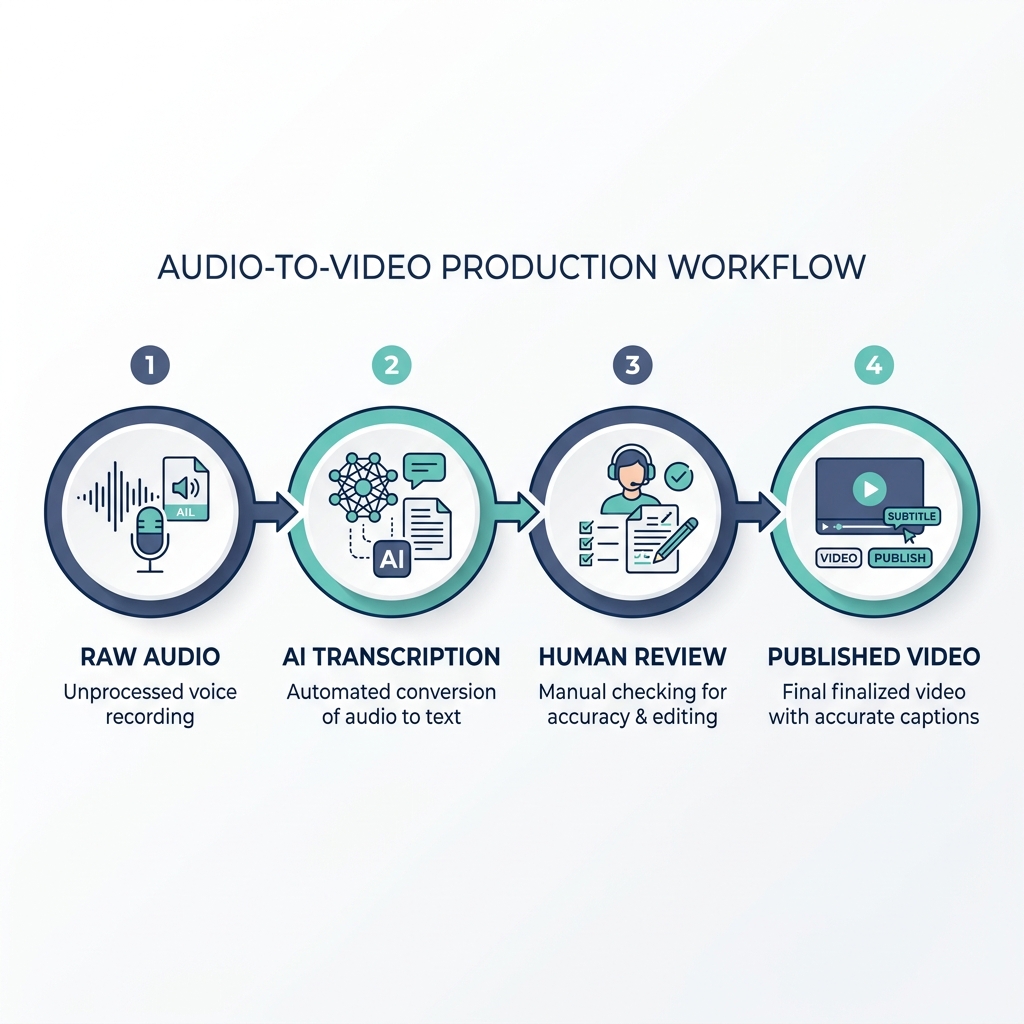
Caption editing workflow: raw audio to publish-ready output
- Raw audio or video file
- AI transcription (speech converted to text)
- Timed caption generation (text assigned to timestamps)
- Accuracy review (homophones, proper nouns, domain terms corrected)
- Timing adjustment (sync captions to within one to two seconds of speech)
- Formatting and style pass (line breaks, casing, punctuation, speaker labels)
- Export and publish
AI Auto-Captioning vs. Manual Editing vs. Hybrid: Which Approach Fits Your Workflow
Choosing a captioning approach is a tradeoff decision, not a preference. Each approach serves a different situation, and most creators default to AI-only without realizing they have accepted a quality tradeoff in the process.
AI-only is fastest and lowest cost per video. For short-form social content where a few errors are tolerable, it is often sufficient. It fails on technical vocabulary, strong accents, and any context where errors create real problems.
Manual captioning delivers the highest accuracy and full control. For legal, medical, branded, or accessibility-compliant content, it is often the only viable choice. The cost is time: manual caption editing runs 5 to 10 minutes per video at minimum. At 60 videos per month, that is 5 to 10 hours of editing time before you film, script, or publish a single frame.
Hybrid is the practical default for most creators. AI generates the captions; a human reviews and corrects. Quality is meaningfully better than AI-only, and it is faster than building from scratch. The catch: it still requires a per-video review step. At volume, that compounds quickly.
For readers exploring how to evaluate AI-powered editing tools more broadly, the same evaluation criteria apply across caption-specific and general AI video workflows.
| Approach | Accuracy Level | Time per Video | Best For | Level of Control | Typical Cost |
|---|---|---|---|---|---|
| AI-Only | Moderate, variable by content | Under 1 minute | Short-form social, low-stakes content | Low | Free to low |
| Manual | High | 5 to 10 minutes minimum | Legal, medical, branded, accessibility-grade | Full | High (time cost) |
| Hybrid | Good, with human review | 3 to 7 minutes | Most creators wanting quality at moderate volume | Moderate to high | Medium |
What Good Caption Editing Actually Looks Like: Quality Standards That Matter
Caption quality is not subjective. There are measurable standards, and meeting them is what separates captions that serve viewers from captions that distract them.
Research consistently shows that captions improve engagement and viewer retention across audiences, not just for viewers with hearing loss. Studies on caption impact confirm that captions increase watch time and comprehension, making quality editing a direct investment in content performance.
Timing accuracy means captions appear within one to two seconds of the corresponding speech and clear the screen before the next line begins. Captions that lag or linger break the viewing experience.
Reading speed matters most on mobile. Roughly three words per second is the practical maximum for comfortable reading. Captions that exceed this pace lose viewers, especially in silent autoplay environments.
Accuracy specifics: homophones, proper nouns, industry terms, and names are where AI tools fail most visibly. These require human review regardless of tool.
Formatting consistency covers punctuation, casing (sentence case versus all-caps), line breaks at natural speech pauses, and speaker labels when multiple voices appear.
Before you publish: caption editing quality check
- Captions sync to speech within one to two seconds -- delayed captions break reading flow and confuse viewers following along.
- No more than two lines of text displayed at once -- crowded captions block the video and reduce legibility on small screens.
- Reading speed is comfortable, no more than three words per second -- captions that scroll too fast lose mobile viewers immediately.
- Homophones and proper nouns are correct -- these are the most common AI failure points and the errors viewers notice first.
- Speaker changes are labeled or clearly indicated -- unlabeled speaker changes create confusion in multi-voice content.
- Punctuation and casing follow a consistent style throughout -- inconsistent formatting signals unreviewed, auto-generated output.
- Captions have been reviewed at least once after AI generation -- AI output should always be treated as a draft, not a final file.
Platform Caption Requirements: What YouTube, TikTok, and Instagram Each Expect
Publishing the same caption approach across every platform without adjusting for requirements is a reliable way to create formatting problems or missed compatibility.
YouTube supports SRT file uploads (SRT is a plain-text subtitle file format where each caption block includes a start time, end time, and the text to display) and auto-generates captions internally. YouTube's captioning documentation outlines supported formats. Auto-generated YouTube captions are notoriously inconsistent on technical content and accented speech. Uploaded, edited captions improve both accessibility and search indexing, since YouTube indexes caption text.
TikTok provides an in-app auto-captions feature with limited manual editing capability. Creators who want consistent styling typically burn open captions directly into the video before uploading, since TikTok's native options are constrained.
Instagram Reels uses open caption overlays rather than a separate caption file. No external SRT import is supported natively. Styling is limited to the platform's built-in options.
For a full breakdown of which caption format each platform requires, including VTT (a web-standard caption file format similar to SRT but used by browsers and some players) and platform-specific file compatibility, see the dedicated captioning formats guide.
| Platform | Caption File Support | Manual Edit Options | Key Limitation |
|---|---|---|---|
| YouTube | SRT upload supported | Full edit before upload | Auto-captions unreliable on technical/accented speech |
| TikTok | No external file import | Limited in-app editing | Minimal manual control; styling constrained |
| Instagram Reels | No SRT import | Open caption overlay only | No external file support; limited style options |
How to Evaluate a Caption Editing Tool or Workflow (Before You Commit to One)
Most caption editing tools are designed for one video at a time. That is a reasonable approach for occasional use. For any creator publishing at real volume, the per-video time cost is the evaluation criterion most tools never surface in their marketing.
Here is what actually matters when you evaluate a tool or workflow:
Accuracy on your content: Test on a sample that includes your actual vocabulary, proper nouns, or accented speech before relying on any tool. Generic demos often use clean audio with standard vocabulary. Your content probably does not.
Manual correction capability: Can you edit after AI generation? How easily? Tools that make correction cumbersome or lock output are a hidden time cost that compounds with every video.
Processing volume and pricing transparency: What does the free tier actually allow, and what happens when you exceed it? Throttling and per-video limits hurt most when you are trying to scale.
Cross-platform availability: A mobile-only tool creates a workflow bottleneck if your editing, scripting, or publishing happens on desktop. Confirm the tool's availability before building a workflow around it.
Scale math: At 5 minutes of review per video, 60 videos per month is 5 hours of caption editing alone. At 300 videos per month, it becomes a part-time job. The right solution at volume eliminates that math rather than optimizing it.
GotReach takes a different approach to this problem. Rather than reviewing one video at a time, it automates video editing and publishing so creators are not manually captioning every video in a queue. GotReach can produce up to 300 videos in 30 minutes from a single idea. That is not a marginal improvement on per-video editing time; it is a different category of workflow entirely. Agencies and multi-client operations managing large content libraries get the same centralized control, without the per-video editing overhead that makes high-volume captioning unsustainable.
What to look for when evaluating a caption editing workflow
| Criterion | What to Check | Why It Matters | Red Flag to Watch For |
|---|---|---|---|
| Accuracy | Test on your actual content, not a demo | AI accuracy varies significantly by vocabulary, accent, and audio quality | No sample or trial available before purchase |
| Manual correction | Can you edit after generation, and how? | Locked output compounds time costs invisibly | No post-generation editing, or cumbersome UI |
| Volume and pricing | What does the free tier allow? What happens at scale? | Per-video limits expose themselves painfully at volume | Vague pricing tiers or hidden throttling |
| Cross-platform availability | Desktop, mobile, or browser-based? | Workflow mismatch creates its own bottleneck | Mobile-only tool for a desktop-first workflow |
| Export format support | Which file types can you export? | Platform requirements differ; mismatched formats create rework | Only one export format with no flexibility |
Compare GotReach plan options to see what the platform offers at different usage levels, including the free plan, which allows up to 30 videos per month with one connected social account and no watermarks.
Accessibility and Compliance: Why Caption Accuracy Is Not Optional
Accessibility is not a bonus feature. It is the baseline reason caption editing exists as a craft standard rather than a nice-to-have.
Three audiences depend on captions to follow your content:
- Deaf and hard-of-hearing viewers, who cannot access audio content without captions
- Non-native language speakers, for whom captions aid comprehension even when audio is audible
- Viewers in silent autoplay environments, which now represents a significant share of most video audiences across social platforms
WCAG and ADA context: WCAG (Web Content Accessibility Guidelines, the international standard for digital accessibility) 2.1 Success Criterion 1.2 requires captions for pre-recorded audio content. ADA (Americans with Disabilities Act) obligations may apply to businesses publishing video content in certain contexts. AI-generated captions alone typically do not satisfy these standards without review, because error rates on proper names, domain vocabulary, and speaker identification are documented failure modes that require correction.
Key accessibility considerations at a glance:
- Deaf and hard-of-hearing viewers, non-native speakers, and silent-environment viewers collectively represent a large share of any video audience
- WCAG 2.1 Success Criterion 1.2 sets the captioning standard for pre-recorded video content
- AI-generated captions frequently miss proper names, domain terms, and speaker changes, the exact categories WCAG review targets
- Human review after AI generation is required for any content with a compliance or accessibility obligation
One important note on GotReach: GotReach automates captioning and publishing at scale, which removes the per-video editing bottleneck for most content. It is not a dedicated accessibility compliance tool. For legal or compliance-grade captioning, human review remains necessary regardless of which platform generates the initial captions.
Putting It Together: Choosing the Right Approach for Your Volume
The right caption editing approach is not the most sophisticated one. It is the one that matches your volume, your accuracy requirements, and your publishing reality.
For low-volume creators publishing occasional content, hybrid captioning with manual review is usually sufficient. The time cost is manageable, and the quality improvement over AI-only is meaningful.
For creators publishing at any real scale, 30, 60, or 300 videos per month, per-video review time is the problem to solve. GotReach automates video editing and publishing across seven social platforms from a single workflow. The free plan covers up to 30 videos per month with one connected social account and no watermarks. It is built for creators who cannot afford to spend 5 to 10 minutes per video on caption review when they are producing content at volume.
Start your 14-day free trial today with no commitment required, and see what a scale-oriented captioning workflow actually looks like in practice.
Frequently Asked Questions
What is the difference between captions and subtitles?
Captions are designed for viewers who cannot hear the audio, so they include dialogue, speaker identification, and relevant sound descriptions. Subtitles assume the viewer can hear but translate or transcribe speech for language accessibility. In practice, many platforms use the terms interchangeably, but the distinction matters for accessibility compliance contexts.
How accurate are AI-generated captions, and do I always need to edit them?
AI captioning accuracy varies significantly by audio quality, vocabulary, accents, and domain specificity. Even high-performing tools fail predictably on proper nouns, homophones, overlapping speakers, and technical terms. Editing is not always required for low-stakes short-form content, but it is required for anything where accuracy, compliance, or accessibility matters.
What caption file format should I use for YouTube, TikTok, or Instagram?
YouTube supports SRT uploads, which is the most widely compatible plain-text caption format. TikTok does not support external caption file imports; open captions burned into the video are the common workaround. Instagram Reels does not support SRT or VTT imports natively. For a full platform-by-platform breakdown, see captioning methods and formats by platform.
When is AI auto-captioning sufficient versus when is manual review required?
AI-only captioning is sufficient for short-form social content where a few errors are tolerable and the stakes of inaccuracy are low. Manual review is required for content with compliance obligations, accessibility standards, branded terminology, or technical vocabulary that AI tools consistently mishandle.
What makes captions accessible for deaf and hard-of-hearing viewers?
Accessible captions are word-for-word accurate, timed to sync with speech, include speaker identification when multiple voices appear, and describe relevant non-speech audio. WCAG 2.1 Success Criterion 1.2 defines the standard for pre-recorded content. AI-generated captions alone typically do not meet this standard without human review.
How long does it take to edit captions for a typical video?
For a 5 to 10 minute video using a hybrid approach (AI generation plus human review), editing typically runs 5 to 10 minutes at minimum, depending on audio quality and vocabulary complexity. Longer videos, technical content, or poor audio quality extend that estimate. At 60 videos per month, that translates to 5 to 10 hours of caption editing before any other production work.