GotReach does not currently clip long-form videos. This article discusses the broader clipping category. For GotReach, use the planned short-form recording workflow, then add captions and schedule the finished videos.
AI Video Clipping Tools: An Honest Comparison to Help You Choose the Right One
Long videos sit unused because cutting them manually takes too long. AI clipping tools promise to fix that, but most of their homepages sound identical: automatic highlights, one-click publishing, studio-quality captions. The claims blur together fast.
This article is the honest comparison those homepages won't give you. It covers how these tools actually work, what separates them, and how to match the right one to your content type and publishing volume.
Key Takeaways
- AI video clipping tools differ significantly in detection method, content-type fit, and pricing. The right choice depends on what you create and how much volume you need.
- Free plans exist across most tools but carry real limits: watermarks, export caps, and monthly clip quotas that vary by platform.
- Accuracy claims should be evaluated against your specific content. Results on clear English podcast audio do not transfer reliably to livestreams, webinars, or accented speech.
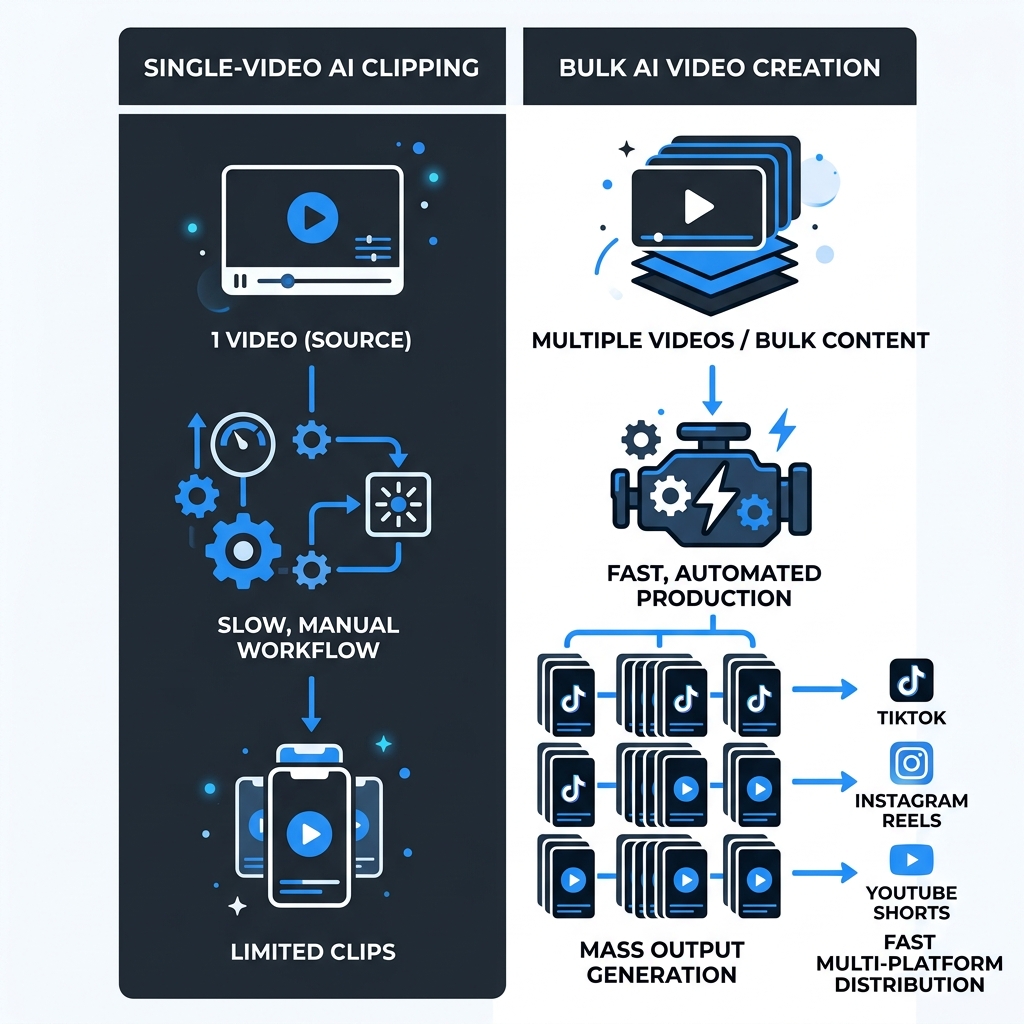
- For creators who need consistent volume across multiple platforms, a bulk creation and distribution platform solves a bigger problem than clip detection alone.
What AI Video Clipping Tools Actually Do (And What They Don't)
These tools use one of three detection approaches. Transcript-based detection reads what was said and finds moments worth clipping based on language. Audio pattern analysis listens for pauses, volume shifts, or applause to identify high-engagement sections. Visual signal detection tracks scene changes or on-screen activity to flag relevant moments.
The typical workflow: upload a video, the AI surfaces 5 to 20 clip candidates, captions are generated automatically, then you review and export or publish. The upload and detection steps are genuinely hands-off. The review step usually is not. Most workflows still require a human pass before publishing, especially if your audio is complex or your topic is niche.
"Automatic" means the AI narrows the field. It does not mean zero-touch output is standard. For a deeper look at how AI clip generators detect highlights, the linked post covers the technical layer without the need to reproduce it here.
Speech-to-text technology from AWS explains how transcript-based detection works at a plain-language level, which is useful context before evaluating accuracy claims from any tool.
What to Look for Before You Choose an AI Clipping Tool
Clip detection accuracy is not a fixed number. It depends on your content type, audio clarity, language, and speaker count. The right question is: what content does this tool perform best on?
Supported input sources vary more than most tools advertise. Some accept YouTube links and direct file uploads only. Others support Zoom recordings, livestream archives, or shared drives. Match the tool to your actual source footage, not the demo reel.
Platform publishing automation depth matters. There is a real difference between a tool that exports an MP4 you manually upload versus one that schedules and publishes directly to platforms from within the same workflow. Know which you are buying.
Caption quality and editability affects both accessibility and performance. Check whether the tool lets you edit captions before publishing and how it handles technical jargon, non-standard English, or overlapping speakers. For a framework on how to evaluate AI caption accuracy before committing to any tool, that post covers the analysis in depth.
Pricing structure and free plan realities vary significantly. Watermarks, monthly clip quotas, and export caps differ by platform. Know what the free tier actually allows before you build a process around it.
| Evaluation Criterion | Why It Matters | What to Look For |
|---|---|---|
| Clip detection accuracy | Inaccurate detection means more manual review time, not less | Ask which content types the tool performs best on; test on your actual footage |
| Supported input sources | Using unsupported sources breaks your workflow | Confirm your file formats, Zoom links, or livestream archives are accepted |
| Platform publishing depth | Export-only tools add manual steps at scale | Look for native scheduling and direct publishing to your target platforms |
| Caption quality and editability | Bad captions hurt performance and accessibility | Check edit controls, language support, and how it handles jargon or accents |
| Pricing and free plan limits | Free plans often gate the features that matter | Confirm watermark policy, monthly quota, and what triggers a paid upgrade |
| Volume capability | Single-video tools create a production bottleneck | If you publish frequently across platforms, ask how many videos the tool handles per session |
Top AI Video Clipping Tools: What Each One Does Well (and Where It Falls Short)
OpusClip is built around transcript-based detection and produces accurate clip candidates from clean, single-speaker audio. Its Virality Score feature ranks clips by predicted engagement. The free tier (as of mid-2026, per OpusClip's pricing page) includes limited clips per month with a watermark on exports. Platform publishing requires a paid plan. Key limitation: one video processed at a time, and accuracy drops noticeably on multi-speaker or low-quality audio.
Spikes Studio targets gaming and livestream content specifically, using audio and visual signal detection rather than transcript-only analysis. This makes it a better fit for unscripted, high-energy footage where spoken language alone is not the engagement signal. Free plan includes watermarked exports and a monthly cap. Key limitation: narrower content-type fit and less polished caption editing than transcript-first tools.
Videotto focuses on interview and podcast formats with a clean editing interface. Caption editing is accessible, and the workflow is straightforward for creators new to short-form repurposing. Key limitation: publishing automation is shallow compared to tools with native platform integrations, meaning more manual steps after export.
Start your 30-day free trial to see what that output volume looks like in your own workflow.
| Tool | Best For | Detection Method | Free Plan | Platform Publishing | Key Limitation |
|---|---|---|---|---|---|
| OpusClip | Podcasts, single-speaker interviews | Transcript-based | Watermarked, limited clips/month | Paid plans only | One video at a time; drops off on complex audio |
| Spikes Studio | Gaming, livestreams, high-energy footage | Audio and visual signals | Watermarked, monthly cap | Limited native publishing | Narrow content-type fit |
| Videotto | Interviews, podcasts, beginners | Transcript-based | Limited exports | Manual export required | Shallow platform automation |
Does This Tool Work for Your Content Type?
Podcast and interview content with one or two speakers and clean audio is the sweet spot for transcript-based tools. Accuracy is high, clip candidates are plentiful, and manual review passes are minimal.
Livestreams and event recordings are harder. Variable audio quality, multiple speakers, and unpredictable structure mean fewer reliable clip candidates and more manual cleanup. Spikes Studio handles this format better than most transcript-first tools.
Pros and cons of AI clipping by content type:
- Podcast and interview: High accuracy, minimal review needed, best candidate for full automation
- Podcast and interview: Limited to speech-first moments; misses visual storytelling cues
- Livestreams and events: Captures high-energy moments that text analysis alone would miss
- Livestreams and events: Inconsistent audio and multiple speakers degrade detection quality significantly
Webinars, course recordings, and slide-based content present a mixed picture. Structured narration helps detection, but heavy visual content like screen shares without strong audio commentary will produce thin results.
Non-English and multilingual content is where most tools overstate their capabilities. "Supported" often means functional, not accurate. Expect meaningfully lower clip quality for non-English speech, heavy accents, and technical jargon. Evaluate free plan output on your actual content before committing to any paid tier.
A creator repurposing a weekly English-language interview podcast is in the best position to use AI clipping with minimal manual review. A marketing team repurposing multilingual webinar recordings will need to build in correction time regardless of which tool they choose.
Pricing and Free Plans: What You Actually Get
Free plans are useful for testing. They are not production-ready for most workflows.
Common gates that trigger a paid upgrade: watermark removal, higher clip volume, team collaboration, direct platform publishing, and API access. Most tools reveal these limits only after you have built a process around the free tier.
| Tool | Free Plan | Common Paid Upgrade Triggers |
|---|---|---|
| OpusClip | Limited clips/month, watermarked exports | Watermark removal, higher clip quota, platform publishing |
| Spikes Studio | Monthly cap, watermarked | Team access, higher volume, native publishing |
| Videotto | Limited exports | Publishing automation, caption editing features |
Pricing data for competitor tools reflects publicly available information as of August 2026 and may change. Verify current tiers directly on each tool's pricing page before making a purchase decision.
When AI Clipping Is Not the Right Answer
Before starting a trial, check whether your situation fits:
- Your footage is primarily visual: B-roll, screen capture, or music-driven content without strong spoken narration
- Your recording has background noise, echo, or overlapping speakers throughout
- Your content is scripted, stylized, or non-linear and relies on creative pacing rather than extracted moments
- Your clips will require color grading, music sync, or tight narrative shaping beyond the source footage
- Your primary language is not English, or your speakers have accents or use heavy jargon
If any of those apply, AI clipping will save less time than expected and may create more correction work than manual editing would.
AI detection relies primarily on speech signals. Footage that tells its story through visuals or music without a clear verbal track will not produce reliable clip candidates. Non-linear or stylized formats benefit from a human editor who can apply creative judgment, not a detection algorithm optimized for extracting standalone spoken moments.
Low audio quality is a compounding problem. Background noise and poor microphone quality degrade transcript accuracy, which cascades into poor clip candidates and inaccurate captions. No tool overcomes fundamentally bad source audio.
Ready to Stop Processing One Clip at a Time?
The free plan includes 30 videos per month with no watermarks. The 30-day free trial gives you the full picture before you commit.
Start your 30-day free trial today and see what that output volume does for your publishing cadence.
If you want to create new short videos in batches, explore GotReach content repurposing. For extracting highlights from a long recording, choose a tool that explicitly supports that task.