GotReach does not currently clip long-form videos. This article discusses the broader clipping category. For GotReach, use the planned short-form recording workflow, then add captions and schedule the finished videos.
How to Choose the Right AI Video Clipping Tool (And What the Marketing Leaves Out)
You have a one-hour recording. You need ten short clips. And you have probably already landed on three or four homepages that all claim to be the "#1 AI video clipping tool" without explaining what makes them different from each other.
AI clipping tools do solve a real problem. Manual editing runs five to ten minutes per video at minimum. Scale that to dozens of videos per week and the math stops working fast. But not every tool solves that problem equally well, and the homepage copy rarely gives you enough information to choose.
This article explains how these tools actually work, what criteria separate useful ones from overhyped ones, and how to match your content type and workflow to the right option before you commit.
Key Takeaways
- AI clip detection relies on transcript scoring, audio energy signals, or engagement pattern modeling. Different tools use different methods, and the method matters for your content type.
- Free tiers vary significantly in what they include. Watermarks, strict credit caps, and processing limits make many free plans difficult to test seriously.
- No AI clipping tool handles all content types equally well. Gaming and sports footage without spoken commentary is a consistent weak point across the category.
- The difference between "export-only" and "auto-post" is significant for high-volume creators. Most homepages do not make this distinction visible.
- Tool choice depends on your content format, publishing pace, and team size. No single tool is the right answer for every creator.
What AI Video Clipping Tools Actually Do (And How the AI Works)
An AI video clipping tool scans your content, identifies moments worth turning into short-form clips, crops and reformats the footage, adds captions, and exports or publishes the result. That is the promise. Here is what is actually happening under the surface.
Most tools rely on some combination of three detection signals:
Transcript content scoring is the most common method. The tool converts your audio to text, then scans that transcript for moments with high information density. Strong quotes, punchy statistics, clear topic shifts, and natural sentence endings all score higher. The AI cuts around silence, filler words, and low-content segments. It is working with language, not with visual action.
Audio energy analysis looks at volume changes, silence gaps, and pacing. A loud laugh, a sudden pause, or a spike in speaking speed can flag a moment as worth clipping. This works as a secondary signal alongside transcription, or on its own for content types with clear audio peaks.
Engagement pattern modeling uses historical data from short-form platforms to weight certain types of moments. The idea is that hooks, punchlines, and transitions tend to perform well, so the model learns to flag content that resembles those patterns.
When vendors say their tool "understands your content" or "scores viral potential," they are describing one or more of these three processes. Understanding which method a tool uses tells you immediately whether it will work for your content.
A podcast with one clear speaker and a punchy quote at minute 14 is close to ideal for transcript-based detection. A gaming stream with no spoken commentary gives a transcript-based tool almost nothing to work with.
AI reframing is a separate process. Most long-form video is 16:9. Short-form platforms want 9:16. The tool automatically crops and repositions the frame to keep the primary speaker visible. This works well with a single, mostly stationary subject. It breaks down with multiple subjects, fast cuts, hands-on product demos, or anything where the important visual action is not a talking head.
Auto-captioning applies speech-to-text transcription to each clip. Accuracy is affected by accent, background noise, and the number of overlapping speakers. A tool that claims 97% or 99.99% accuracy is quoting a figure measured under near-ideal conditions. Real-world accuracy with heavy accents, crosstalk, or ambient noise will be lower.
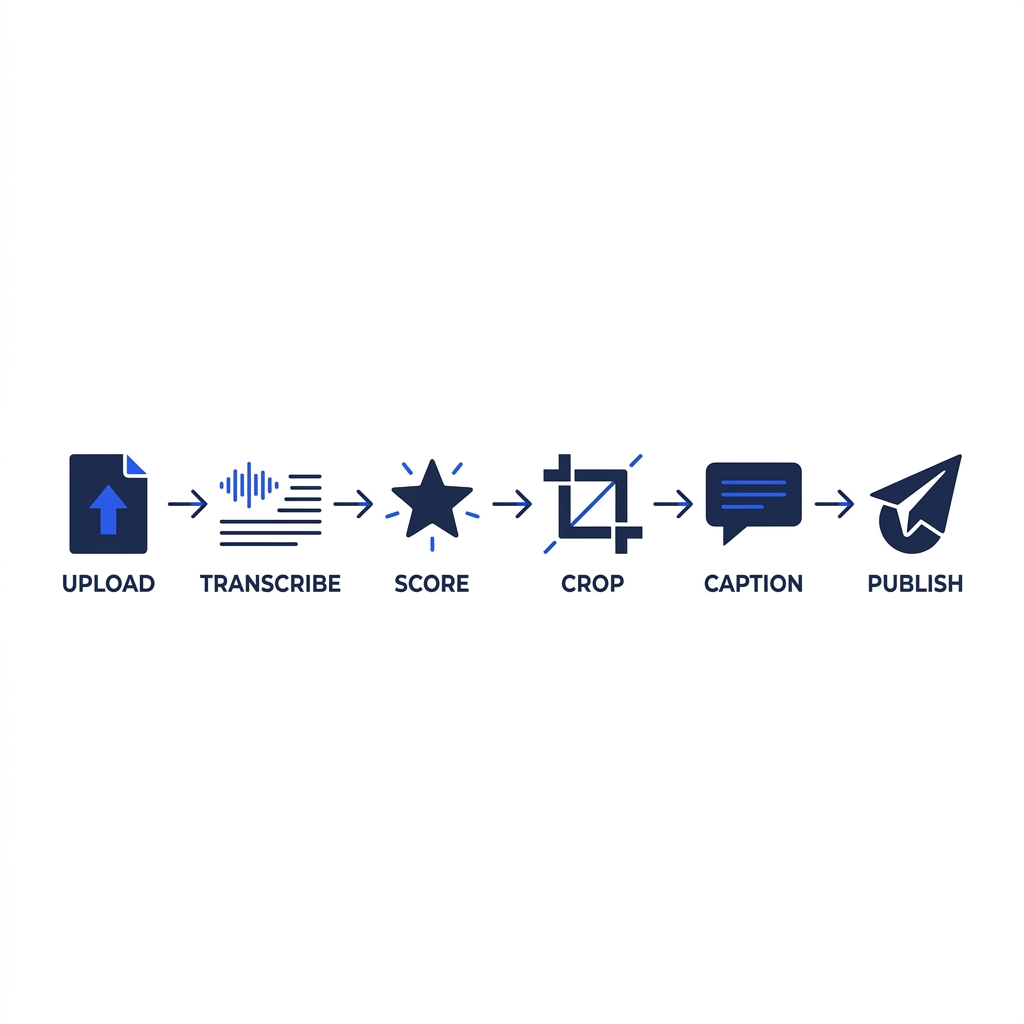
The AI Clipping Pipeline: What Happens to Your Video
- Upload - Your video is submitted to the platform's processing queue.
- Transcription - Speech-to-text converts the audio track into a time-stamped transcript.
- Clip scoring - The AI evaluates transcript segments (and audio energy signals) to identify candidate clip moments.
- Reframing - The tool crops from 16:9 to 9:16 (or another target ratio), tracking the primary subject.
- Caption generation - Captions are applied to the clip based on the transcription output.
- Review and export - You review the clips, adjust as needed, and export or publish directly from the platform.
For a deeper look at how AI clip generators process video at the technical level, how AI clip generators process video covers the mechanics in more detail.
What to Look For Before You Choose a Tool
Most tool homepages list nearly identical features. "AI-powered clip detection. Auto-captions. Multi-platform publishing." The differences that actually matter for your decision are the ones listed in smaller print, or not listed at all.
Here are the criteria worth evaluating before you sign up anywhere.
Content type compatibility. Many tools are optimized for interview and podcast content. If your video is a gaming stream, a product walkthrough, or a panel with four speakers, ask specifically whether the tool handles that format. "Supports all video types" is not the same as "performs well on all video types."
Caption accuracy in real conditions. Vendors quote accuracy percentages without specifying the conditions they were measured under. How to evaluate caption accuracy claims breaks down what those numbers actually mean. The short version: accuracy degrades with accents, background noise, and overlapping speakers. Ask whether the tool lets you edit captions before publishing, and how much correction you should expect on your specific content. The underlying technology is automatic speech recognition (ASR), and its real-world performance varies considerably across content conditions.
Publishing depth. There is a meaningful operational difference between a tool that exports a file to your desktop and one that auto-schedules and posts directly to your platforms. For creators publishing at high volume, export-only tools add a manual step that compounds quickly. Confirm which category a tool falls into before you build a workflow around it.
Free tier real limits. Most free tiers include one or more of the following: watermarks on output, a small number of processing credits per month, time limits on uploaded videos, or restricted access to publishing integrations. Understanding exactly where the wall is helps you evaluate whether serious testing is possible before paying.
Reframing quality. Ask the tool to process a clip that involves movement, multiple people, or visual action. Reframing that works smoothly on a talking-head interview can cut off faces, miss subjects, or track the wrong element in other formats.
Volume scalability. Some tools are designed around one-video-at-a-time workflows. Others are built for bulk creation. If your content output is growing, make sure the tool you choose can keep pace.
Before You Sign Up: Questions to Ask Any AI Clipping Tool
- Does the tool specifically support my content type (podcast, stream, product demo, multi-speaker panel)?
- What does the free tier actually include, and what action triggers a paid upgrade?
- Does it auto-post directly to my platforms, or does it only export files?
- How does it handle multiple speakers, heavy accents, or significant background noise?
- What happens to my uploaded video? Who owns the content and the output?
- Can it scale if my output grows to dozens or hundreds of videos per week?
How Leading AI Video Clipping Tools Compare
The table below covers the tools that come up most often in this category. No single winner is declared. The right tool depends on what is in your second column.
| Tool | Best Creator Fit | Content Type Compatibility | Free Tier | Pricing Starts At | Publishing Depth | Key Limitation |
|---|---|---|---|---|---|---|
| OpusClip | Podcasters, interview creators | Strong for speech-based content; limited on non-dialogue video | Limited credits; watermark on free clips | ~$15/month | Direct posting to major platforms | Struggles with non-speech content; reframing varies by scene complexity |
| Vizard | Marketers, solo creators | Interview and talking-head optimized | Credit-limited free tier; watermark applied | ~$10/month | Export and some direct publishing | Less suited to high-volume or multi-client workflows |
| Videotto | Marketers, e-commerce brands | Broad format support; some product demo capability | Restricted credits on free plan | ~$19/month | Export-focused with limited auto-post | Narrower platform publishing integrations |
| WayinVideo | General creators | Multi-format, including some non-speech support | Free tier available with processing limits | ~$12/month | Export and direct post options | Reframing quality varies; fewer team features |
Pricing and feature details for competitors are based on published information current as of 2026 and may change. Confirm current plans directly with each provider.
Which Tool Fits Your Content Type and Workflow
The comparison table gives you the full picture. This section gives you the short version based on your creator type.
Podcasters and interview creators are the best-served segment across this category. Transcript-based clip detection works well when there is one or two clear speakers and structured conversation. Prioritize tools with strong multi-language caption support and accurate speaker separation if your podcast regularly features guests with varied accents.
Streamers and gaming creators should approach most tools in this category with caution. Transcript-based detection has almost nothing to work with when there is no spoken narrative, and reframing struggles with fast-paced visual content. Look explicitly for tools that claim gaming or action content support, then test that claim on your actual footage before committing.
Marketers and brand teams typically care more about publishing consistency and volume than about individual clip quality. Auto-scheduling, brand-consistent output, and the ability to publish across multiple platforms without manual handoffs matter more than clip-detection sophistication. The operational workflow is the product.
Creator Type to Feature Priority: Quick Reference
| Creator Type | Top Priority | Second Priority | Watch Out For |
|---|---|---|---|
| Podcasters and interview creators | Caption accuracy, speaker separation | Multi-language support | Free tier credit limits |
| Streamers and gaming creators | Content type compatibility (non-speech) | Reframing quality on fast footage | Tools optimized only for talking-head video |
| Marketers and brand teams | Multi-platform auto-publishing | Volume scalability | Export-only tools masking as publishers |
| Agencies and freelancers | Centralized multi-client dashboard | Bulk creation speed | Per-seat pricing that compounds at scale |
| High-volume solo creators | Volume capacity per session | Platform publishing depth | Tools capped at low monthly video limits |
Where AI Clipping Falls Short (And What to Do About It)
Any page that only describes the upside is selling something. Here is where AI clipping tools consistently underperform, and what a realistic quality-control workflow looks like.
When AI clipping works well:
- Podcast and interview content with one or two clear speakers and structured conversation
- Single-speaker video with defined topic segments and minimal background noise
- High-volume repurposing workflows where speed matters more than surgical precision on every clip
- Content where a rough first draft saves significant time even if some manual review follows
When manual editing is still needed:
- Gaming or sports footage with no spoken commentary. Transcript-based tools have nothing to score.
- Heavy accents or significant background noise. Caption accuracy and clip selection both degrade.
- Multi-speaker panels with frequent crosstalk. A one-hour panel discussion with four speakers and constant interruptions will produce lower-quality clip selection, unreliable reframing, and captions that require significant correction.
- Highly technical content where a single out-of-context clip could damage brand credibility. AI does not understand nuance. It flags energy, not meaning.
- Product demos that rely on visual action rather than dialogue. Reframing tracks faces, not hands or product details.
Reframing failure cases to know: Fast camera movements, multiple subjects sharing the frame, and action sequences where the important visual element is not the primary speaker all create reframing problems. The AI tracks what it has been trained to track, and in most tools that is a face near the center of the frame.
A realistic quality-control workflow before publishing any AI-generated clip:
- Check caption accuracy on proper nouns, technical terms, and any branded language.
- Watch the clip with the sound off to confirm the reframing kept the important visual elements in frame.
- Verify the clip makes sense without the surrounding context of the original video.
- Confirm the opening two seconds create a reason to keep watching without relying on what came before it in the full recording.
AI output is a strong first draft in the right conditions. It is not a finished product ready to publish without a look.
Pricing and Free Tier Reality Check
Free tiers are useful for a first look. They are rarely generous enough to tell you whether a tool will work at your real publishing pace.
What most free tiers actually include: A small number of processing credits per month, watermarks on output clips, limits on video length or file size, and restricted access to publishing integrations. Some tools cap you at three to five clips per month on the free plan. That is not enough volume to evaluate clip quality across your content type.
What paid plans unlock: Higher monthly clip or video limits, watermark removal, additional platform connections, team seats, and priority processing. The specific gates vary by tool, but these are the consistent upgrade triggers across the category.
The metric that matters for high-volume creators: Monthly price divided by expected monthly video output. A tool at $50 per month that produces 300 videos costs roughly $0.17 per published video. A tool at $20 per month that caps you at 20 videos costs $1.00 per video. The monthly price comparison misses the real value difference.
Cost-Per-Video Framing: How to Evaluate Pricing at Your Volume
| Monthly Output Target | Manual Editing Time (at 5-10 min/video) | Example Plan Cost | Approx. Cost Per Video | Time Saved |
|---|---|---|---|---|
| 10 videos/month | 50-100 minutes | $10-$20/month | $1.00-$2.00 | Moderate |
| 50 videos/month | 4-8 hours | $20-$50/month | $0.40-$1.00 | Significant |
| 300 videos/month | 25-50 hours | Varies by plan | Fraction of manual cost | Near-complete automation |
At five to ten minutes of manual editing per video, 300 videos per month requires 25 to 50 hours of editing time. A tool that automates that at any reasonable price point pays for itself in the first week of use.
The Right Tool Is the One That Fits Your Actual Workflow
Every tool in this category will tell you it is the smartest, fastest, and most accurate. That framing does not help you decide.
The decision comes down to three things: your content format, your publishing volume, and how much of the process you need automated versus how much you want to control. A podcaster publishing two episodes per week needs something different than an agency managing fifteen client accounts or a creator pushing 300 pieces of content per month.
If you want to create new short videos in batches, explore GotReach content repurposing. For extracting highlights from a long recording, choose a tool that explicitly supports that task.