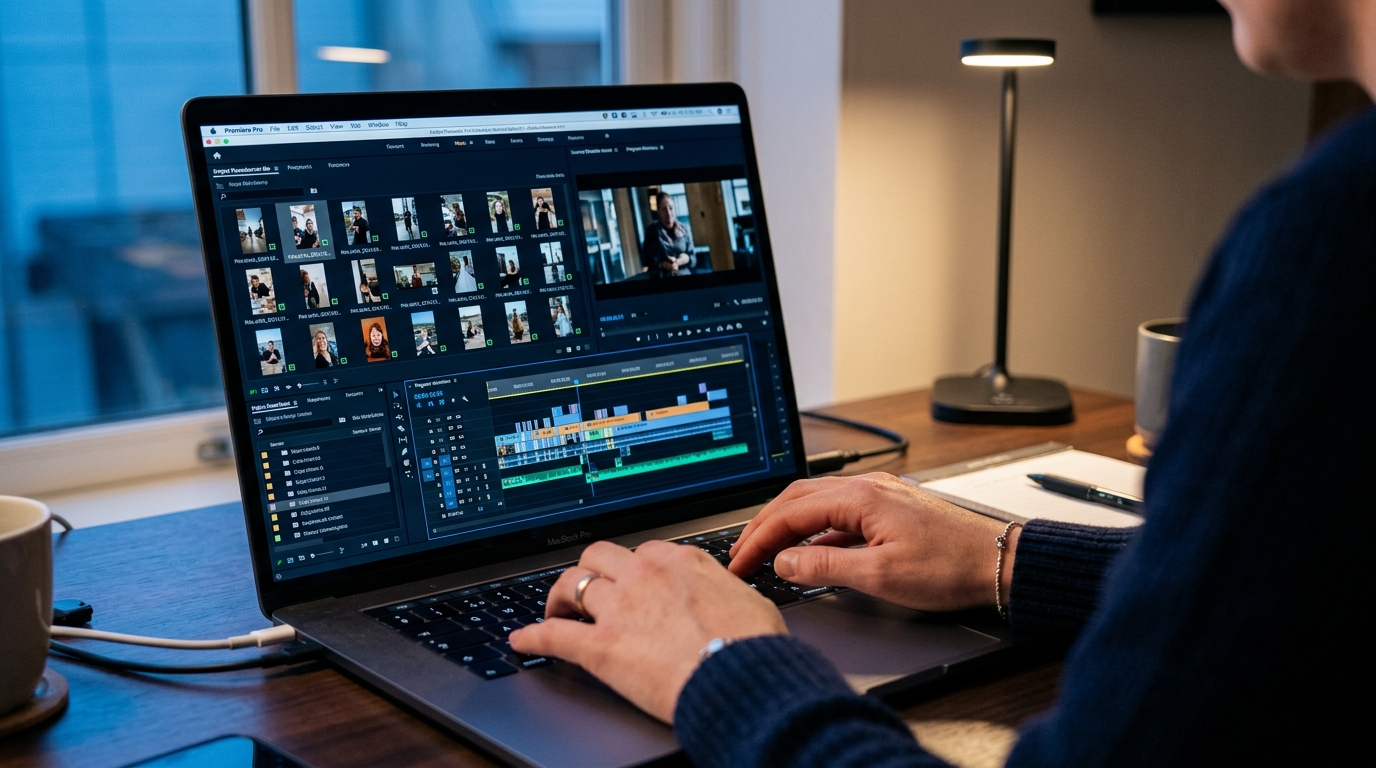
GotReach does not currently clip long-form videos. This article discusses the broader clipping category. For GotReach, use the planned short-form recording workflow, then add captions and schedule the finished videos.
AI Clip Maker: How to Choose the Right Tool and Get the Best Results
You have hours of recorded content and a posting schedule that demands a dozen short clips a week. Manual editing takes 4 to 8 hours per video. Single-video AI tools take 5 to 10 minutes each and still leave you reviewing output one clip at a time. The math does not work.
So you search for an AI clip maker, and the first page of results is wall-to-wall vendor landing pages. Every one of them claims to be the fastest, most accurate, and most likely to make your content go viral. None of them explain how the AI actually selects clips, what the free plan actually gives you, or what happens when the tool gets it wrong.
This article is the resource those pages are not. It is a criteria-driven evaluation framework built around the questions that actually matter when choosing an AI clip maker: how does the detection work, what can you realistically do for free, which tool fits your video type and team size, and what will you still need to fix before you hit publish.
You will leave here knowing exactly what to look for. Not which brand spent the most on its marketing page.
Key Takeaways
-
AI clip makers vary significantly in how they detect moments, handle multiple speakers, and structure their free tiers. The right tool depends on your video type and workflow, not just a feature list.
-
Viral scoring is a probabilistic signal based on historical engagement patterns. It is not a guarantee and should be used as a prioritization tool, not a publication decision.
-
Free plans across tools carry real constraints: credit limits, watermark conditions, and upload caps that are often buried in fine print.
-
Before publishing any AI-generated clip, a brief quality review catches the most common failure modes: mid-sentence cuts, caption sync errors, and wrong speaker attribution.
What an AI Clip Maker Actually Does
At its core, an AI clip maker takes a long video, identifies the moments most likely to perform as standalone short-form content, and outputs formatted, captioned clips ready for publishing. That is the promise. Here is how it actually unfolds.
The End-to-End Workflow
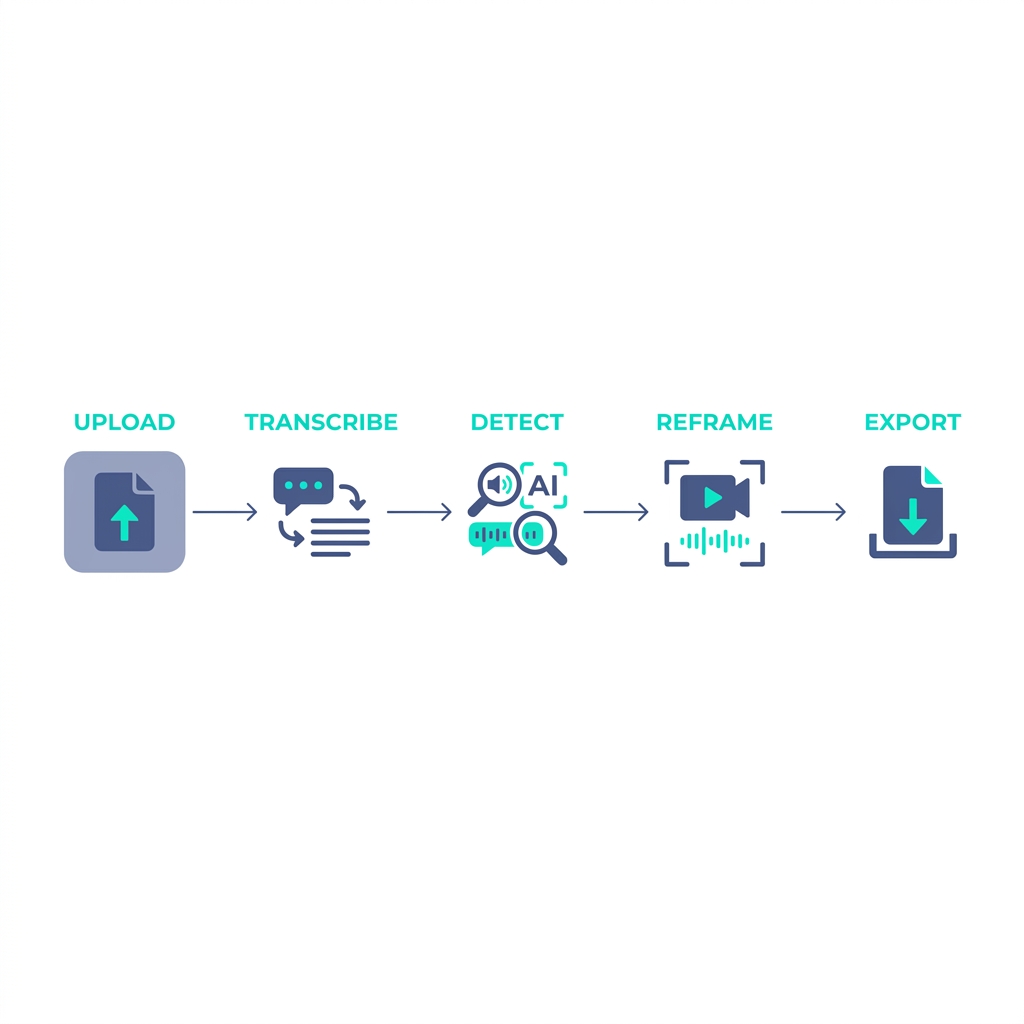
- Upload your video. You submit a long-form file: a podcast episode, a webinar recording, a YouTube video, a live stream replay.
- Transcription. The AI generates a text transcript of the audio. This is the foundation everything else builds on. If your audio quality is poor, everything downstream suffers.
- Moment detection. The AI scans the transcript and audio for high-value segments: energy peaks, pacing changes, emotionally resonant phrases, and dense idea clusters. It flags these as candidate clips.
- Vertical reframing. The selected clips are reformatted from landscape (16:9) to vertical (9:16) for TikTok, YouTube Shorts, and Instagram Reels. Better tools use face detection to keep the speaker centered. For platform format specs, Sprout Social's video format guide covers current requirements across platforms.
- Caption generation. Captions are auto-generated and burned into the video or exported as a caption file. Style, font, and color options vary by tool.
- Export or publish. Clips are downloaded or pushed directly to connected social accounts via the tool's publishing integrations.
A one-hour podcast episode typically yields 8 to 15 candidate clips from an AI tool. Realistically, 3 to 5 of those will need trimming or caption correction before they are ready to publish. That is still a significant improvement over building every clip from scratch.
Manual editing of a one-hour video into short clips takes 4 to 8 hours. AI clip tools compress the generation step to minutes. The review step remains, but it is shorter.
What AI clip makers cannot do: guarantee virality, fix poor source audio, produce perfect output every time, or substitute for your editorial judgment on context and framing. Any tool that implies otherwise is overpromising.
How AI Moment Detection and Clip Scoring Actually Work
Every AI clip maker claims its detection is powered by advanced AI. Few of them explain what that means in practice. Here is what is actually happening.
Audio energy peaks. The AI monitors volume and intensity shifts in the audio track. A moment where a speaker raises their voice, pauses for effect, or accelerates their pace registers as a high-energy signal worth flagging.
Pacing and rhythm changes. Sudden shifts in speaking rate often correlate with emphasis. A speaker who slows down to make a point or speeds up through a story is giving the AI a signal that something important is happening.
Sentiment and emotional tone. Natural language processing runs on the transcript to identify emotionally charged language: strong opinions, surprising claims, direct advice, or humor. Segments with concentrated sentiment signal clip potential.
Keyword density clusters. The AI identifies segments where high-value terms appear in close proximity. These topic-dense moments often perform well as standalone clips because they deliver concentrated value. Research on NLP-based moment detection in video analysis provides academic context for how these signals are applied in practice.
Tools differ in how many of these signals they combine. Transcript-only tools rely purely on text analysis. They work reasonably well for interview and podcast formats where the spoken content carries the value. Multimodal tools layer in audio energy and sometimes visual cues alongside the transcript. That additional signal layer improves performance on content types where delivery matters as much as words: live presentations, sports commentary, and emotionally driven storytelling.
If you create gaming content, corporate video, or anything where the visual action is a significant part of the story, a transcript-only tool is likely to underperform. The AI cannot see what is happening on screen.
What viral scoring actually means. When a tool assigns a clip a viral potential score, it is running the clip's characteristics against patterns from historically high-performing content. It is a probabilistic confidence score, not a promise. A clip that scores 92 out of 100 for viral potential might be a 45-second emotionally charged exchange that genuinely resonates. It might also be a clip that sounds provocative but misleads the viewer without the surrounding context.
Clip objective settings, available in some tools, shift how the AI weights these signals. Set to virality, the tool prioritizes energy and emotional charge. Set to trust-building or lead nurturing, it shifts toward clarity, authority, and call-to-action density. Understanding this setting changes how you interpret the output.
For more on how AI clip generation works at the technical level, that foundational explainer covers the underlying mechanisms in more depth.
The practical implication: treat viral scoring as a prioritization tool. It tells you which clips to review first, not which clips to publish without looking.
Key Criteria for Evaluating Any AI Clip Maker
Vendor feature lists are not evaluation frameworks. A feature list tells you what a tool has. These criteria tell you whether those features will actually work for your content, your team, and your budget.
Transcription and Caption Accuracy
Transcription quality is the root of everything. If the transcript is wrong, the moment detection is wrong, and the captions are wrong. Accuracy degrades predictably in specific conditions: background noise, overlapping speech, non-English accents, and multiple speakers talking in close proximity.
No tool consistently achieves the accuracy percentages vendors claim. Treat those figures as best-case scenarios recorded in studio conditions. For your content, test with a representative sample before committing. For a detailed breakdown of what affects caption accuracy and transcription quality across tools, that dedicated guide covers the variables in depth.
Video Genre Versatility
Most AI clip makers are built and trained on podcast and interview content. They work well on that format. They often underperform on gaming streams (where audio narration is secondary to on-screen action), corporate presentations (where speaker energy is deliberately flat), sports highlights (where the moment is visual), and documentary-style content with minimal speaking.
Before committing to a tool, test it on the actual format you produce. Do not evaluate a gaming clip tool using a podcast.
Free Tier Reality
"Free plan available" is not useful information. What you need to know: how many videos or minutes are included per month, whether exports carry a watermark, whether there is an upload duration cap, and what happens when the free credits run out. Some tools pause your access; others switch you to a degraded output mode without warning.
Multi-Speaker Handling
For podcasts, interviews, panels, and any content with two or more speakers, multi-speaker detection is a make-or-break criterion. The question is not just whether the tool labels speakers but whether it maintains clip continuity across a dialogue exchange, assigns captions correctly by speaker, and avoids attributing all speech to one track.
Test this with a real two-speaker segment from your content. Review caption attribution manually. Do not trust the vendor's sample video.
Caption Quality and Customization
Captions directly affect viewer retention on mute-first platforms. Beyond accuracy, consider: can you adjust font, size, color, and position? Can you correct errors before export? Are captions word-by-word or phrase-by-phrase? Phrase-based captions tend to read better and perform better on social.
Publishing and Scheduling Integrations
How many platforms does the tool connect to natively? Is scheduling built in or handled through a third-party connector? How much friction exists between clip approval and publication? A tool that creates great clips but requires manual re-upload to every platform is a partial solution.
Team and Agency Workflow Support
Solo creators can work with single-user tools. Brands and agencies cannot. Multi-user access, centralized client management, and the ability to run bulk creation across multiple accounts without separate logins per client are the relevant criteria here. For agencies managing five or more clients simultaneously, this is the criterion that eliminates most tools from consideration.
Evaluation Criteria at a Glance
| Criterion | Why It Matters | What to Test For |
|---|---|---|
| Transcription and caption accuracy | Everything downstream depends on the transcript quality | Test with your actual content type; check error rate on accents, crosstalk, and background noise |
| Video genre versatility | Most tools are optimized for interview and podcast formats | Upload a representative sample from your actual format before committing |
| Free tier reality | Credit limits, watermarks, and upload caps are often buried | Confirm videos per month, watermark policy, upload duration cap, and what happens when credits run out |
| Multi-speaker handling | Misattributed captions and broken clip continuity are common failure points | Test with a real two-speaker segment; review caption attribution manually |
| Caption quality and customization | Captions affect retention; bad captions can misrepresent the speaker | Check phrase pacing, font controls, and whether errors can be corrected before export |
| Publishing and scheduling integrations | Clip creation is only part of the workflow | Count connected platforms, confirm native scheduling, and test re-upload friction |
| Team or agency workflow support | Single-user tools break down at agency volume | Confirm multi-user access, client management, and bulk creation capability |
How Major AI Clip Maker Tools Compare
The table below applies the evaluation criteria from the previous section across the major tools in the category. No tool wins on every criterion. The goal is an honest view of where each fits, not a ranking.
| Criterion | OpusClip | Choppity | Spikes Studio | WayinVideo |
|---|---|---|---|---|
| Best for (use case) | Individual creators extracting highlights from podcast and interview video | Podcasters and interview-format creators | Streamers and gaming content creators | Marketers repurposing long-form video |
| Free tier reality | Limited free credits; watermark on exports; credit cap reached quickly in testing | Free tier available; export limits apply; review watermark policy before assuming free = usable | Free plan with clip limits; watermark present on free exports | Free plan available; credit and export limits vary; confirm terms before trialing |
| Caption accuracy notes | Claims high accuracy; self-reported figures; performance varies with accents and crosstalk | Strong on clean interview audio; degrades with noisy or overlapping speech | Performs well on gaming audio; handles commentary-style narration | Adequate for standard interview formats; test with your specific content |
| Multi-speaker handling | Speaker labels available on paid tiers; clip continuity across dialogue is a stated feature | Basic speaker handling; test with real two-speaker content before assuming production-ready | Designed around single-narrator gaming streams; limited multi-speaker capability | Speaker detection available; verify accuracy with your own content |
| Publishing integrations | Direct publish to major platforms; scheduling available on paid plans | Export-focused; publishing integrations limited; verify current platform connections | Direct upload to Twitch and YouTube; limited short-form platform integration | Publishing integrations available; confirm platform list before committing |
| Bulk or volume creation | One clip at a time; 5 to 10 minutes per video; bulk is not a stated capability | One clip at a time; not designed for high-volume output | One clip at a time; optimized for highlight reels, not bulk content creation | Batch processing available on higher tiers; confirm volume limits |
Which AI Clip Maker Fits Your Use Case
Different workflows have fundamentally different requirements. One-size-fits-all tool recommendations fail most creators because they ignore this.
Solo creators and YouTubers should prioritize free tier generosity, caption quality, and ease of use. Volume is often secondary when you are producing one or two videos a week. Start with a free plan that genuinely lets you evaluate output quality without hitting a credit wall in the first session.
Podcasters need multi-speaker detection, clip continuity across dialogue exchanges, and support for episode-length uploads. A tool that handles 10-minute clips but chokes on a 90-minute episode is not a podcast tool regardless of what the marketing says. Test with a full-length episode from your actual feed.
Brands and marketing teams care less about viral scoring and more about consistent output quality, brand template controls, and the ability to maintain a recognizable visual identity across clips. Multi-platform publishing and team access to review clips before they go live matter more than clip generation speed.
Use-Case Decision Matrix
| Creator Type | Top Priority | Second Priority | Third Priority | Best Fit |
|---|---|---|---|---|
| Solo creator or YouTuber | Free tier generosity | Caption accuracy | Ease of use | Trial free plans from clip-from-footage tools; evaluate with real content |
| Podcaster | Multi-speaker handling | Episode-length upload support | Clip continuity across dialogue | Tools with documented speaker detection; test before committing |
| Brand or marketing team | Consistent output quality | Brand template controls | Multi-user access and review workflow | Tools with team access and publishing integrations |
Once you know which row describes your workflow, you have a sharper brief for your trial. Start a free trial to see how the output holds up against your actual content.
Common AI Clip Maker Failures and How to Catch Them Before Publishing
No competitor page talks about this honestly. Here is what actually goes wrong and how to catch it before a clip goes live.
Mid-Sentence Cuts
AI clip endpoint selection is based on engagement scoring, not grammar or logical completion. The result is clips that end mid-word or begin a sentence before cutting off the thought. This is one of the most common failure modes and one of the easiest to miss when reviewing quickly. Always play the first and last three seconds of every clip and confirm both the opening and closing land on complete thoughts.
Poor Moment Detection on Low-Quality Audio
AI transcription and moment detection both degrade when source audio has background noise, reverb, echo, or recording artifacts. The AI cannot compensate for a bad microphone or a room with significant ambient sound. The fix is upstream: improve audio quality at the recording stage. If that is not possible, accept that you will need more manual review time on output from that content.
Caption Sync Errors
Captions can drift out of sync when a speaker's pace is irregular, when there are long pauses, or when the speaker has a strong accent the transcription model does not handle well. The error often appears as captions that trail behind the speech or display the wrong word during a high-speed segment. Spot-check captions at the 25%, 50%, and 75% marks of every clip rather than only reviewing the beginning.
Wrong Speaker Attribution in Multi-Speaker Content
In dialogue or panel content, the AI may assign all captions to one speaker track or swap attribution mid-clip. Caption color coding that incorrectly labels who is speaking is a credibility issue, especially in interview formats where the speaker's identity matters to the clip's meaning. Review dialogue clips manually before publishing.
High Viral Score, Wrong Context
A clip can score high for engagement potential while being genuinely misleading without the surrounding context. A 45-second exchange that sounds provocative may need two sentences of surrounding content to be accurate and fair. Viral score is a prioritization signal. It is not an editorial review. A high score means the AI thinks this clip has energy. It does not mean the clip is ready to publish.
Before You Publish Any AI-Generated Clip, Run Through This Checklist
- Does the clip start and end at a complete thought with no mid-sentence cuts?
- Are captions synced to speech throughout? Spot-check at 25%, 50%, and 75% through the clip.
- Is the correct speaker attributed in multi-speaker clips? Review caption labels manually.
- Does the clip make sense out of context? Would a viewer who has not seen the full video misread the speaker's meaning?
- Is the video properly reframed for vertical? Confirm no cropped faces or key visuals at the frame edges.
- Has the AI-selected clip been reviewed for accuracy? Do not rely on viral score alone as a publication signal.
Putting It Together: How to Move Forward
You now have an evaluation framework you can apply to any AI clip maker you trial. The criteria matter more than the feature list. The free tier details matter more than the headline claim. The failure modes are predictable and catchable if you know to look for them.
If you are ready to test the framework against a real tool, start a free trial and run your own content through it. If you want to see how the tiers break down before committing, review the plan options to understand what each level includes.
The evaluation is yours. You have the criteria to run it.
If you want to create new short videos in batches, explore GotReach content repurposing. For extracting highlights from a long recording, choose a tool that explicitly supports that task.