AI Captions: How They Work, What Affects Accuracy, and How to Choose the Right Tool
You are producing video content and you have heard that AI can add captions automatically — but you are not sure how reliable it actually is, which tool fits your workflow, or whether the free option is good enough for what you need.
Most content on this topic is either a brand's own product page or a vague "AI captions are amazing" article that skips the parts that actually matter. This guide explains how the technology works under the hood, where it falls short, and how to pick the right tool for your specific situation — not the most popular one.
By the end, you will have a clear framework for evaluating any AI captioning tool and a checklist you can use before you publish.
Key Takeaways
- AI captions are generated by speech-to-text technology that listens to your audio, converts spoken words to text, and syncs each segment to a timestamp — the process is fast, but the output is not always error-free.
- Accuracy depends on audio quality, speaker accent, background noise, and vocabulary type — not all tools perform equally across all content types.
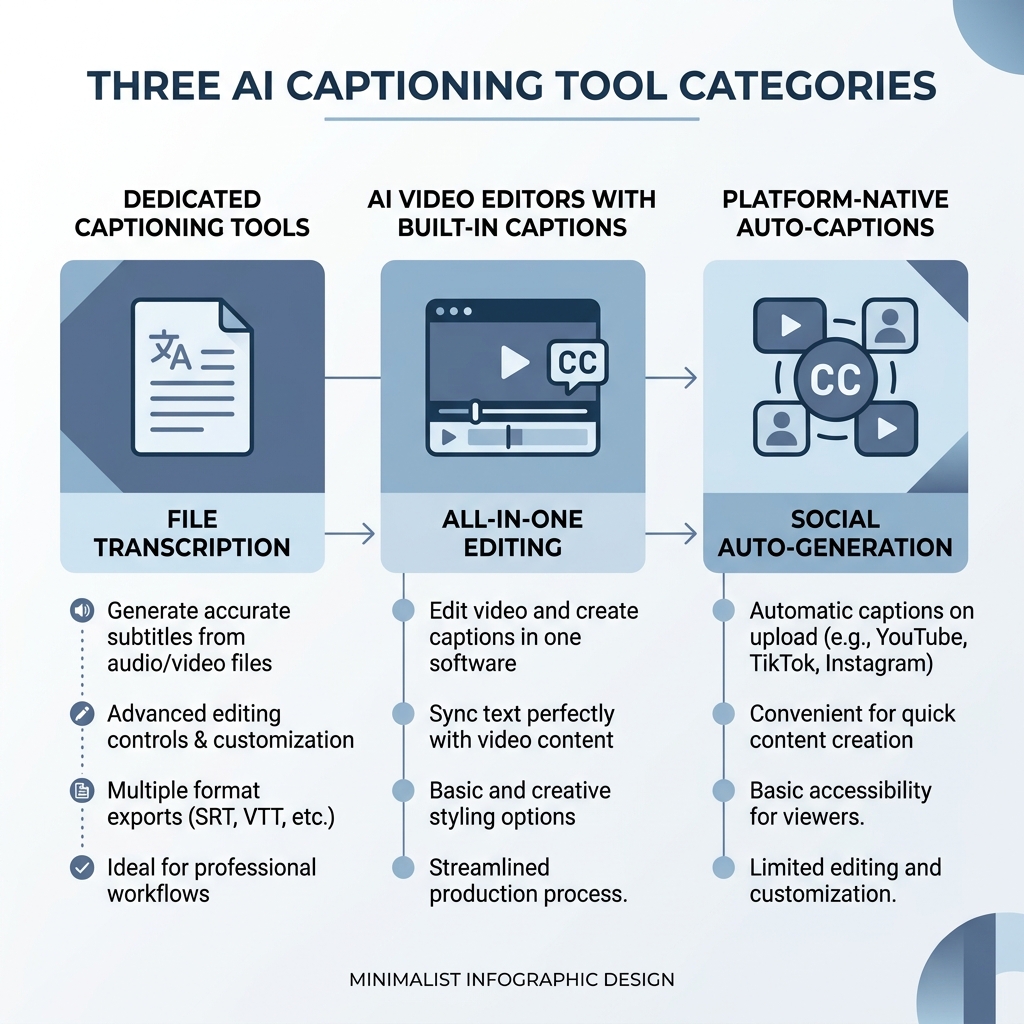
- Three distinct tool categories exist: dedicated AI captioning tools, AI video editors with captioning built in, and platform-native auto-captions — each fits a different workflow and production volume.
- Captions are not optional for reaching your full audience: a significant share of social video is watched without sound, and captioned video is more discoverable in search.
- The right AI caption tool is the one that matches your platform targets, production volume, and quality bar — not necessarily the one with the most name recognition.
What AI Captions Are and How They Work
AI captions are automatically generated on-screen text that is synchronized to the spoken audio in a video. When you upload a video, the tool listens to the audio track, converts spoken words into text, and assigns each word or phrase a start and end time so it appears on screen in sync with speech. That is the core process — speech-to-text transcription combined with timestamp alignment.
The speed of this process is one of its main advantages over manual captioning, where a human types and times every word. The tradeoff is that machine-generated output reflects the quality of the audio and the capability of the underlying AI model, which is why accuracy requires attention rather than assumption.
Before going further, it helps to have these four terms clearly defined — they are used interchangeably in the wild, but they mean different things:
| Term | What It Is | When You Would Use It |
|---|---|---|
| AI Captions | Machine-generated text synced to spoken audio, created automatically by a captioning or video tool | Any video where you want automated text-on-screen without manual typing |
| Subtitles | Text translations of dialogue for viewers who speak a different language — not the same language as the spoken audio | Distributing video to an international audience in a second language |
| Closed Captions | Text that can be toggled on or off by the viewer, typically includes non-speech audio cues (e.g., [music], [applause]) — designed for accessibility | Broadcast, streaming platforms, and accessibility-compliant video |
| Burned-In Captions | Text permanently embedded into the video frame — cannot be turned off or edited after export | Social media platforms that do not support external caption files, or when you want guaranteed display |
For a deeper look at accessibility standards around captions, the W3C Web Accessibility Initiative guidance on captions is the authoritative reference.
Understanding these distinctions matters because the tool type you choose often determines which of these formats you can produce — and some platforms or use cases require a specific one.
Why AI Captions Matter More Than Most Creators Realize
The case for captions goes well beyond the generic claim that they "boost engagement." There are four concrete reasons captions affect whether your video reaches the people it is meant to reach.
Silent-scroll viewing. A substantial share of social video is consumed without sound, particularly on mobile. Viewers scrolling a feed in a public place, a meeting, or a quiet environment will not turn audio on — they will either read the captions or keep scrolling. Research on caption engagement patterns confirms that captions meaningfully affect watch time and viewer retention, particularly in silent-viewing contexts.
Accessibility and compliance. For viewers with hearing loss, captions are not a nice-to-have — they are how the content becomes usable at all. Beyond individual accessibility, certain corporate, educational, and public-sector contexts carry obligations under the ADA (Americans with Disabilities Act) and WCAG (Web Content Accessibility Guidelines). If your video will be embedded on a company website, used in employee training, or distributed through an institution, captions may not be optional.
Video SEO and discoverability. Search engines cannot index audio. A caption file — specifically an SRT or VTT file attached to or embedded in your video — gives search engines text to crawl and index. For YouTube in particular, accurate captions improve the likelihood that a video surfaces for relevant search queries. For web-hosted video, a transcript derived from captions adds indexable content to the page.
Reach for non-native speakers. Captions help viewers whose first language is not the same as the spoken content follow along with nuance they might otherwise miss. For any creator building a global or multilingual audience, captions are part of what makes content actually usable — not just technically visible.
Quick reference:
- Captions keep silent-scroll viewers engaged who would otherwise leave
- Accessibility compliance requires captions in many corporate, educational, and public contexts
- SRT and VTT caption files make video content indexable by search engines
- Non-native speakers rely on captions to follow content accurately
What Affects AI Caption Accuracy — And When to Review Before You Publish
AI caption accuracy is the topic that almost every competitor article avoids — which is exactly why it is the most important thing to understand before choosing or trusting a tool.
The Four Main Accuracy Factors
Audio quality. This is the single biggest variable. Clean audio recorded close to the source with minimal background noise produces far more accurate transcription than audio recorded in a room with echo, a laptop mic with hiss, or a phone in a crowded environment. If the AI cannot hear the words clearly, it will guess — and guesses produce errors.
Speaker accent and dialect. Most AI transcription models are trained heavily on standard North American or British English. Speakers with regional accents, non-native English accents, or non-standard dialects may see meaningfully lower accuracy. This is not a flaw unique to any one tool — it reflects the composition of the training data across the industry.
Background noise and overlapping speakers. Music under a voiceover, ambient crowd noise, or two people speaking simultaneously are harder for AI models to separate cleanly. The transcription output often drops words or substitutes phonetically similar words when audio signals compete.
Technical and domain-specific vocabulary. A tool trained on general speech will struggle with specialized terms — a dermatology explainer, a legal training video, or a software walkthrough that uses product-specific terminology will produce more errors than a general-topic video. Brand names and proper nouns are particularly prone to substitution with common words that sound similar.
What Accurate Actually Means in Practice
AI captioning tools generally report high word-level accuracy under ideal conditions. In practice, accuracy drops when any of the four factors above is working against you. The honest framing: AI captions are reliable enough for most social media content, casual brand video, and informational YouTube content — but they are not a substitute for professional human transcription in contexts where errors carry real consequences.
For a compliance training video for a healthcare client, a captioned webinar submitted for an ADA accommodation request, or legal documentation, the cost of a missed word or a homophone substitution is high enough that human review or professional transcription is worth it. For a five-minute YouTube explainer or a short-form social clip, a light review before publishing is usually sufficient.
Common AI Caption Error Patterns to Watch For
- Homophone substitutions: "their" transcribed as "there," or a product name that sounds like a common word getting replaced
- Dropped words in fast speech: speakers who talk quickly through a complex sentence may see a word or two disappear from the output
- Name misspellings: people's names, brand names, and place names are transcribed phonetically and often wrong on first pass
- Missed punctuation: AI models vary in how reliably they insert commas and periods; missing punctuation breaks readability on screen
Before You Publish: Caption Quality Checklist
Use this before publishing any AI-generated captions:
- Check that speaker names, brand names, and technical terms are spelled correctly
- Verify caption timing syncs with speech — watch for captions that appear early or cut off late
- Confirm no words are dropped in fast-speech or overlapping-audio segments
- Review any accented-speech segments for substitution errors
- Ensure punctuation and sentence breaks make the text readable on screen
- Confirm caption line length fits your platform's display format (shorter lines work better on mobile)
This review takes three to five minutes for a short video. It is not a reason to avoid AI captions — it is the step that makes AI captions actually reliable.
Types of AI Caption Tools: Which One Fits Your Workflow
Before comparing specific products, it helps to understand the three categories they fall into. Choosing the right category saves more time than comparing individual features within the wrong one.
Dedicated AI captioning tools are purpose-built for transcription and caption output. Their primary job is to produce accurate, editable captions in flexible formats — SRT files, VTT files, burned-in text. They typically offer more control over caption timing, styling, and export options than tools where captioning is a secondary feature. They are the right fit for creators whose primary output need is high-quality, standalone caption files — a podcast producer adding captions to YouTube uploads, for example, or a team that needs to deliver SRT files to a client.
AI video editors with captioning built in treat captioning as one capability within a broader production and distribution workflow. You edit, style, and publish the video in the same tool — captions are generated alongside the rest of the production process rather than as a separate step. For teams producing video at high volume across multiple platforms, this integration removes a bottleneck. A platform like GotReach — which can turn a single idea into hundreds of publish-ready videos in one session and distribute across seven platforms — fits this category: captioning is part of an automated production pipeline rather than a standalone output.
Platform-native auto-captions (YouTube's automatic captions, TikTok's auto-caption feature, Instagram's caption sticker) are free and built directly into the platform. They are the fastest path to captions for casual or low-stakes use. The limitations are real: accuracy varies, customization is minimal, and captions stay within that platform — you cannot export an SRT file from YouTube auto-captions and use it elsewhere. For occasional personal content, they are often sufficient. For consistent brand video or multi-platform distribution, they are typically not enough.
Which category fits your situation? Ask yourself three questions:
- Do you need standalone caption files (SRT/VTT) for delivery or multi-platform use, or are captions just for a single platform?
- Are captions your final production step, or one step in a broader creation and publishing workflow?
- Are you publishing occasionally or at high volume?
Your answers will point you toward one of these three categories before you ever compare specific tools.
| Tool Type | Best For | Accuracy Focus | Customization | Export Options | Typical Pricing Model |
|---|---|---|---|---|---|
| Dedicated AI captioning tool | Creators who need high-quality, editable captions as a primary output — podcasters, video producers, accessibility-focused teams | High — optimized for transcription accuracy | High — timing, style, line breaks, format control | SRT, VTT, burned-in, plain text | Per-minute, subscription, or credit-based |
| AI video editor with captioning | Teams producing video at scale across multiple platforms — agencies, brand content teams, multi-client operations | Moderate — accurate enough for production use; captioning is one feature among many | Moderate — style and animation options, less granular timing control | Burned-in, platform direct publish; file export varies by tool | Subscription, often tiered by output volume or seats |
| Platform-native auto-captions | Casual creators, personal content, single-platform publishing where export is not needed | Variable — depends on platform model; generally lower than dedicated tools | Low — limited or no styling and timing control | None — captions stay within the platform | Free |
Key Features to Evaluate When Choosing an AI Caption Tool
Once you know which tool category fits your workflow, the next step is evaluating the specific tools within it. Here are the criteria that actually matter — and what to look for in each.
Language and accent support. If your content is in a language other than English, or if your speakers have strong regional accents, verify that the tool has specific support for those language variants — not just a long list of supported languages. Translation features (auto-generating captions in a second language from an English source) vary significantly in quality across tools.
Caption customization. For long-form corporate or educational video, plain readable captions are usually sufficient. For short-form social content, caption style is part of the visual identity — font, color, animation, and positioning all affect whether captions feel native to the platform or like an afterthought. Know how much control you need before comparing options.
Export formats. An SRT file (SubRip Subtitle format) is the most widely compatible caption file format — it works across YouTube, most video players, and editing software. A VTT file (WebVTT format) is the web standard, used for HTML5 video and many streaming contexts. Burned-in captions are permanently embedded in the video frame, making them visible everywhere without requiring a separate file — useful for social platforms that do not support external caption files. Know which format your workflow requires before choosing a tool.
Processing speed and volume limits. Free plans almost always cap the number of minutes you can process per month, and sometimes impose slower processing queues. A creator publishing daily content can exhaust a free tier in the first week of the month. If volume is a real factor in your workflow, check the free tier limits honestly before committing — and factor in how quickly that grows into a paid plan. For high-volume teams, GotReach's plan options are built for teams managing multiple clients or accounts at scale, including an Enterprise tier for large operations.
Platform integrations and workflow fit. A tool that lives on mobile, a web app, or desktop software affects how it fits into your existing process. If you edit on a desktop and caption on your phone, that friction compounds over time. Check whether the tool connects to the platforms you publish on, and whether it saves steps or adds them.
Evaluation Criteria Grid
| Evaluation Criterion | Why It Matters | What to Look For |
|---|---|---|
| Language and accent support | Accuracy varies significantly across languages and regional accents — a tool optimized for US English may underperform on accented speech or non-English content | Specific language variants listed, not just a count of supported languages; test with a real sample of your content |
| Caption customization | Style control matters more for social and brand video than for corporate or educational formats | Font, color, animation, positioning, and line-break control — match to your platform and content aesthetic |
| Export formats | Different platforms and workflows require different formats — no single format works everywhere | SRT for broad compatibility, VTT for web use, burned-in for social platforms without native caption support |
| Processing speed and volume limits | Free and lower tiers often cap monthly minutes or throttle processing speed — a bottleneck for high-volume producers | Exact monthly minute allowance, overage handling, and queue priority on paid vs. free plans |
| Platform integrations | Direct publishing integrations reduce manual steps; lack of integration means extra file-handling in every workflow | Native integration with your publishing platforms, or at minimum easy file export to your editing tool |
| Pricing and free tier limits | Free tiers often restrict export formats, volume, or caption styles — understanding the real cost at your production volume prevents surprises | What is restricted on the free tier vs. what requires a paid plan, and whether the paid tier matches your actual output volume |
FAQ: Common Questions About AI Captions Answered
Are AI captions accurate enough to publish without reviewing?
For most social media content and casual brand video, yes — with a light review before publishing. AI captioning tools perform well on clean audio with a single speaker in standard English. The review step is not about fixing wholesale errors; it is about catching the specific patterns AI gets wrong: proper nouns, homophones, dropped words in fast speech. For compliance-critical content — legal, medical, or formal accessibility accommodation — human review or professional transcription is the more reliable standard.
What is the difference between AI captions, subtitles, and closed captions?
AI captions are machine-generated text synced to the spoken audio in the same language as the video. Subtitles are text translations of dialogue for viewers who speak a different language — a separate function from captioning. Closed captions are a specific format designed for accessibility: they can be toggled on or off by the viewer and typically include non-speech audio cues like [music] or [applause]. Most AI captioning tools generate captions (and sometimes closed captions), not subtitles in the translation sense, though some tools offer translation as an additional feature.
Can AI captions be used for ADA or accessibility compliance?
In many cases, yes — AI-generated captions can satisfy accessibility requirements when accuracy is verified before publication. The W3C Web Accessibility Initiative guidance on captions outlines what constitutes accessible captions under WCAG standards. The important caveat: WCAG and ADA compliance depends on caption accuracy, not just caption presence. For high-stakes contexts — formal ADA accommodation requests, public-sector video, or accessibility audits — human-reviewed captions or professional transcription provide a more defensible standard than unreviewed AI output.
Which AI caption tool works best for TikTok and short-form video vs. YouTube and long-form content?
For TikTok and short-form video, platform-native auto-captions handle casual content fine, but creators who want styled, animated captions with brand consistency typically use a dedicated captioning tool or an AI video editor with style controls. For YouTube and long-form content, a dedicated captioning tool that exports SRT files gives you the most control over accuracy, editing, and SEO value from the caption file. The practical split: short-form social favors tools with strong style and animation options; long-form favors tools with strong accuracy, editing controls, and SRT/VTT export.
Are free AI captioning tools good enough for professional use?
For occasional use with simple content, free tiers are often sufficient. The breakdown points are volume, export format, and quality bar. Most free plans cap monthly processing minutes — a creator publishing five or more videos per week will typically exhaust a free tier quickly. Free tiers also commonly restrict SRT and VTT file export, leaving burned-in captions as the only output option. And for professional client deliverables where caption accuracy reflects on the work, the review burden from a weaker free-tier model often costs more time than a paid plan saves in price.
Choosing Your Next Step
You now have the framework: you understand how AI captions are generated, what actually affects accuracy, which tool category fits different workflows, and what criteria matter when comparing specific tools.
The next move depends on where you are in the process. If you are a creator posting regularly to a single platform, a dedicated captioning tool or platform-native captions with a quick review process is likely sufficient. If you are managing content production across multiple platforms at scale — multiple clients, multiple accounts, or a team producing volume content — a full AI video production workflow removes the captioning bottleneck as part of a larger automation.
GotReach is built for that second scenario: an AI-powered video platform that can turn a single idea into hundreds of publish-ready videos in one session and distribute across seven platforms from a single workflow. It is not a dedicated captioning tool — it is a production and distribution system for teams that need to scale output without scaling effort.
If that fits your situation, start your 14-day free trial of GotReach and see how it handles your production volume. No pressure to commit — the trial is the right way to find out if the workflow fits before you do.