
AI Caption Generators: Social Media Captions, Video Subtitles, and How to Get Better Results From Both
If you searched for an AI caption generator and landed on a tool that did something different from what you expected, you are not alone. The term covers two very different products: one that writes post copy for Instagram or LinkedIn, and one that transcribes speech into on-screen subtitles for videos. Using the wrong one wastes time and produces outputs you will largely rebuild from scratch.
This guide clarifies which type fits which job, shows you how to get meaningfully better outputs through smarter inputs, and gives you a practical framework for choosing the right tool at your current volume.
Key Takeaways
- AI caption generators split into two categories: social media text generators (language model tools) and video subtitle generators (speech-to-text tools). Most tools specialize in one.
- Output quality is almost entirely determined by input quality. A weak prompt produces generic copy; a specific prompt produces something usable.
- Good captions look different on every platform. Tone and structure matter more than character count.
- Editing AI captions is a normal part of the workflow, not a sign the tool failed. Brand terms, accents, and jargon are the most common failure points.
- If you are producing more than a few videos per week across multiple platforms, a single-video captioning tool becomes a bottleneck fast.
Two Tools, One Name: What "AI Caption Generator" Actually Means
The confusion starts with the name. Both products are called AI caption generators, but they do completely different things.
A social media caption generator takes a text prompt and produces post copy. You describe the content, the tone, and the audience, and the tool returns a draft caption for Instagram, TikTok, LinkedIn, or wherever you are posting. These tools are built on large language models (LLMs) and are not doing any audio or video processing.
A video caption generator does the opposite. It takes a video or audio file, transcribes the spoken words using automatic speech recognition (ASR), and returns on-screen subtitles or closed captions. No text prompt required. The input is the audio track.
Some all-in-one platforms combine both functions inside a broader editing and publishing workflow. Most standalone tools handle one or the other.
For readers who want to go deeper on video caption formats and methods, adding captions to video is covered in detail in a separate guide.
| Social Media Caption Generator | Video Caption Generator | |
|---|---|---|
| Input | Text prompt, topic, or image | Video or audio file |
| Output | Post caption text | On-screen subtitles or closed captions |
| Primary use | Instagram, TikTok, LinkedIn post copy | YouTube, ads, accessibility compliance |
| AI method | Language model (LLM) | Speech-to-text (ASR) |
| Editing needed | Yes: tone and brand voice | Yes: accuracy and jargon gaps |
A creator who needs subtitles burned into a TikTok video does not need a text-prompt caption generator. Those are different products. Identifying which one you actually need is the first decision to make.
Why Your AI Caption Results Are Only as Good as Your Inputs
AI caption generators do not read minds. They produce generic outputs when they receive generic inputs. The prompt is the lever.
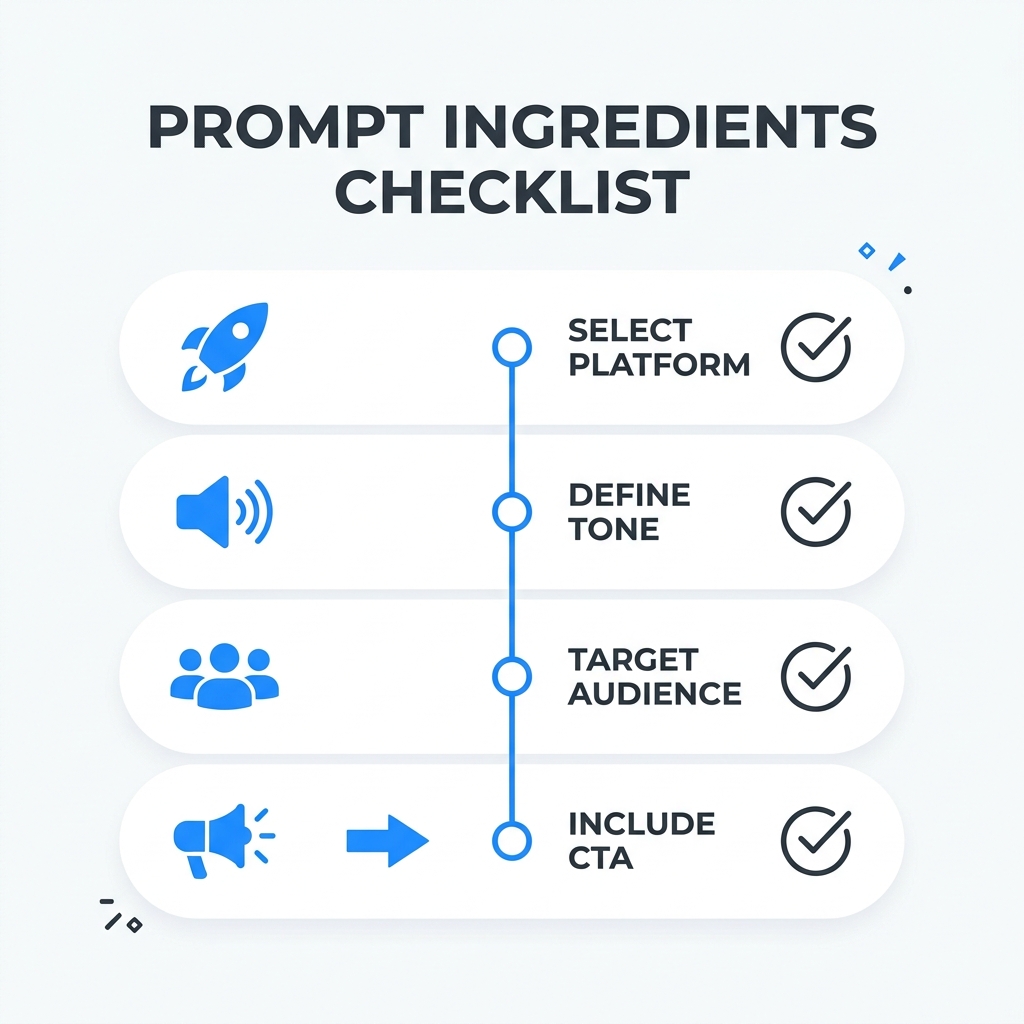
Four inputs consistently improve output quality:
- Platform target -- Instagram captions have a different register than LinkedIn posts.
- Intended tone -- Conversational, professional, playful, or direct. Name it.
- Audience description -- Who is reading this, and what do they care about?
- A specific angle or CTA -- What do you want the reader to feel or do at the end?
AI caption outputs are drafts. Build editing into the workflow from the start rather than treating it as a remediation step if results disappoint.
Here is what the difference actually looks like:
Weak Prompt: "Write a caption for my product photo."
Output: "Check out our amazing new product! Available now. #shop #new"
Strong Prompt: "Write an Instagram caption for a product photo of a sustainable water bottle. Tone: conversational and eco-conscious. Target audience: outdoor enthusiasts aged 25 to 40. Include a question to encourage comments. End with a soft CTA."
Output: "Your trail, your bottle. This one goes where you go and leaves nothing behind. What is your go-to hydration hack for long hikes? Grab yours before the next adventure. Link in bio."
What changed: the strong prompt gave the tool a platform, a tone, an audience, a structural directive, and a specific CTA. The model had enough context to produce something that actually sounds like content instead of filler. The tool did not get smarter. The input got better.
What Good AI-Assisted Captions Look Like on Each Platform
Character count rules are the least useful thing you can learn about platform captions. What actually matters is tone and structure. AI tools can get you most of the way there if you specify the platform in your prompt.
Here is how the same core message shifts across four platforms:
Instagram Hook first, before the "more" cutoff. Story-driven or CTA-led. Conversational register. Hashtags at the end, not buried in the copy.
"One bottle. Every trail. Zero waste left behind. What is the one piece of gear you never hike without? Shop the link in bio." Annotation: Opens with a punchy three-part hook. Ends with a question to drive comments, then a clear CTA. Hashtags would follow after a line break.
TikTok The first line has to earn the tap. Shorter almost always wins. Tone is direct and energetic.
"This water bottle survived 14 miles. Here is why hikers are switching." Annotation: Hook promises a story and a payoff. No hashtag clutter in the caption itself. The video does the heavy lifting.
LinkedIn Lead with the observation or takeaway, not the context. Professional but not stiff. Organic reach cuts off around 25 words before truncation, so the opening line carries the most weight.
"Most sustainable products are a compromise. This one is not. Here is what the data on outdoor consumer behavior actually shows." Annotation: Leads with a counterintuitive claim. Signals value before asking for a click. The register is professional without being corporate.
YouTube Description captions serve search. They are metadata, not post copy, and they are a different format from on-screen subtitles. Do not use the same tool or the same prompt for both.
"In this video: a breakdown of the Trail Pro water bottle -- materials, durability testing, and how it stacks up for day hikes versus multi-day routes. Timestamps below." Annotation: Written to be indexed, not to hook an emotional response. Timestamps and keywords belong here, not in the on-screen subtitle track.
When to Edit AI-Generated Captions Before You Publish
Editing AI captions is not a sign the tool failed. It is part of a professional content workflow. The goal is reducing editing time, not eliminating human judgment.
The most common failure points to watch for:
- Brand-specific terminology and product names -- AI has no brand context unless you give it some. Generic product names or misspellings are the most frequent issue in social media caption outputs.
- Accents, background noise, and fast speech -- These are the conditions where ASR transcription accuracy drops most noticeably. Plan for manual review in these scenarios, not as an exception.
- Technical or industry-specific jargon -- Speech-to-text models handle common vocabulary well and specialized terms less reliably. A medical, legal, or engineering context will require more editing than a lifestyle brand.
- Paid advertising and legally sensitive copy -- AI captions are not compliance tools. Any content with legal weight or ad spend behind it needs human review before it publishes. For accessibility compliance requirements in video captions, the WCAG 2.2 guidelines for prerecorded captions set the governing standard.
For a deeper look at AI caption accuracy and how to evaluate tool quality, this guide on caption accuracy and tool selection covers benchmarks and evaluation criteria in detail.
Before you publish an AI-generated caption, check:
- Brand-specific terms and product names are spelled correctly
- Tone matches the platform and your audience, not a generic content template
- CTA is present and specific, not a vague "click here" or "learn more"
- Hashtags are relevant and intentional, not auto-populated filler
- No factual claims the AI may have introduced without basis
- Video captions: proper nouns, accents, and technical terms reviewed for transcription errors
- Paid or legally sensitive content: human reviewed before any spend is placed behind it
How to Choose the Right AI Caption Generator for Your Use Case
There is no single best AI caption generator. There is the right tool for your use case and your volume.
Start with two filters:
Use case first. Do you need post copy for social media, subtitles for video files, or both? Most tools specialize in one. All-in-one platforms that handle both are less common and worth evaluating carefully on both functions.
Volume second. A free single-video tool works for occasional content. It becomes a bottleneck when you are producing five or more videos per week. Manual captioning at 5 to 10 minutes per video adds up to 25 to 50 minutes per week on captions alone before scheduling, reformatting, or publishing. At that pace, the tool is not the problem. The workflow around it is.
| Use Case | Tool Type to Look For | Key Feature to Prioritize | When Scale Changes the Calculus |
|---|---|---|---|
| Social media post captions | Text-prompt caption generator | Platform targeting and tone controls | Bulk generation for content calendars |
| Video subtitles or closed captions | ASR-based video caption tool | Transcription accuracy and export formats | Multi-video batch processing |
| Both social and video captions | All-in-one video editing platform | Integrated captioning and publishing workflow | Seven-platform distribution from one place |
| Agency or multi-client production | Enterprise video automation | Centralized control and volume output | 300 videos in 30 minutes vs. 5 to 10 minutes per video |
For individual creators posting a few times a week, a standalone caption tool is a reasonable starting point. Explore GotReach's plan options to see what free versus paid access unlocks as your volume grows.
For brands and agencies producing content at scale, the bottleneck is rarely the caption generator itself. It is the entire workflow around it: reformatting for each platform, re-captioning for each audience, republishing one video at a time. GotReach automates video editing and publishing across seven platforms from a single workflow. Bulk creation of up to 300 videos in approximately 30 minutes from a single idea replaces the math that does not work at volume: 5 to 10 minutes per video multiplied by five platforms multiplied by a weekly content calendar.
GotReach Enterprise provides centralized multi-client control for agencies producing content at scale, so the captioning and distribution bottleneck does not compound across accounts.
Start Here
If you are still figuring out which tool type fits your workflow, use the comparison table above to self-identify. If you are already using a caption generator and getting mediocre results, revisit the prompt you are giving it before switching tools.
For creators and brands ready to stop managing captions one video at a time, start your 30-day free trial today and see what a centralized workflow across seven platforms actually changes.
Frequently Asked Questions
What is the difference between an AI caption generator for social media and one for video subtitles? Social media caption generators use language models to produce post copy from a text prompt. Video caption generators use speech-to-text (ASR) technology to transcribe spoken audio into on-screen subtitles or closed captions. They are different tools built for different inputs and outputs.
How do AI caption generators actually work? Social media caption tools use large language models (LLMs) that predict contextually appropriate text based on your prompt. Video caption tools use automatic speech recognition (ASR) to convert audio waveforms into text. Both require editing -- one for tone and brand voice, the other for transcription accuracy.
How do I write a better prompt to get higher-quality AI captions? Specify the platform, the intended tone, the target audience, and any specific CTA or angle you want included. The more context you provide, the more specific the output. A prompt that includes all four of those elements consistently outperforms one that just describes the content.
What does a good AI-generated caption look like on Instagram vs. TikTok vs. LinkedIn? Instagram captions lead with a hook before the fold, use a conversational register, and place hashtags after the copy. TikTok captions prioritize the first line above all else -- it has to earn the tap. LinkedIn captions open with the observation or takeaway, not the setup, and read as professional without being stiff. YouTube descriptions are search-indexed metadata, not emotional post copy -- they serve a different function entirely.
When do AI-generated captions need human editing, and what should I check? Always check brand-specific terminology, CTA specificity, hashtag relevance, and any factual claims the AI may have introduced. For video captions, pay attention to proper nouns, accents, technical jargon, and any content that will have ad spend or legal weight behind it.
Is a free AI caption generator good enough, or do I need a paid tool? For occasional content, a free single-video tool is often sufficient. The trigger for upgrading is volume: when manual captioning at 5 to 10 minutes per video starts competing with time you need for strategy, ideation, or publishing, the math changes. Paid tiers typically unlock batch processing, platform targeting, and brand voice controls that free plans do not include.
Can one tool handle both social media captions and video subtitles? Some all-in-one platforms do, but most standalone tools specialize in one or the other. If you need both functions reliably, evaluate each function independently rather than assuming a tool that does both does either one well.